stevedee

Standard Member
Joined
Nov 26, 2025
Messages
75
Reaction score
116
Points
38
Location (town/city + country)
Bognor
Driving
MGS5
There is a 'reverse engineered' project on Github to access data using the MG API called: saic-python-client-ng

Much of the work and coding examples relate to other MG models, which was a surprise to me when they didn't really work with the S5.
So I had to iterate through a collection called 'cars' to reveal the data names used in the S5 API.

A few simple things I've found so far (which may or may not be new to you) include:-
- although the Model is returned as: MGS5 EV, the Series is: MZS3E S
- the colour of our car is called: Piccadilly Blue, but the API returns the name: Soul Blue ...a name I much prefer.
Does this mean its Soul Blue in Asia and has been renamed by those funny marketing people in Europe?
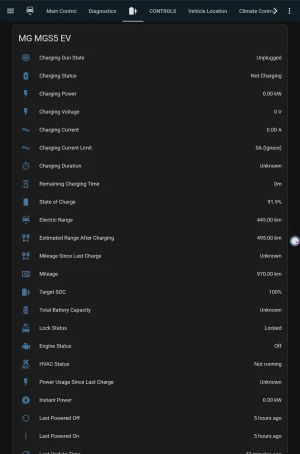
- the API returns 2 version of range: BMS (based upon chemistry & SoC), and IMCU (based upon driving history & climate).
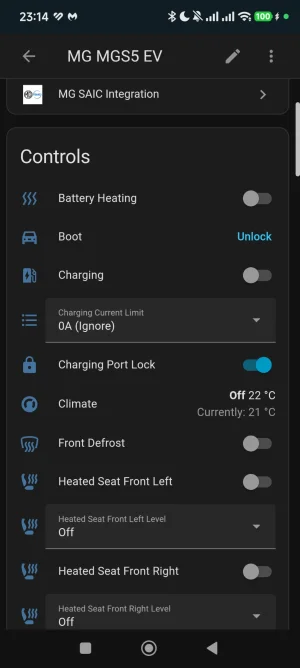
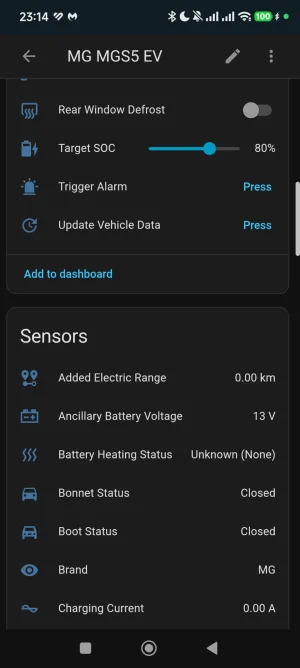
- I can see the system 12V battery voltage and confirm that it is charging when the traction battery is charging.
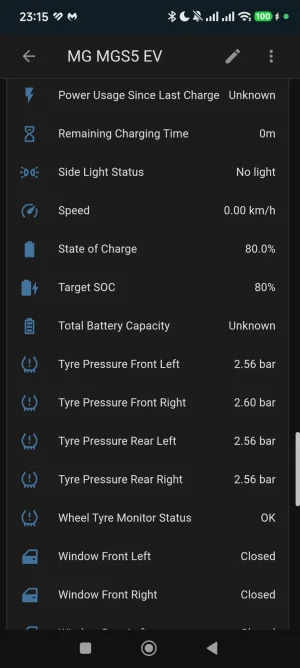
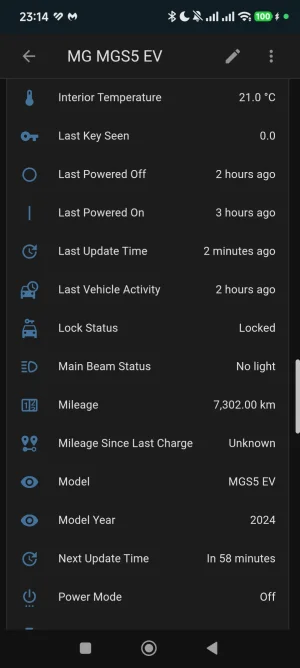
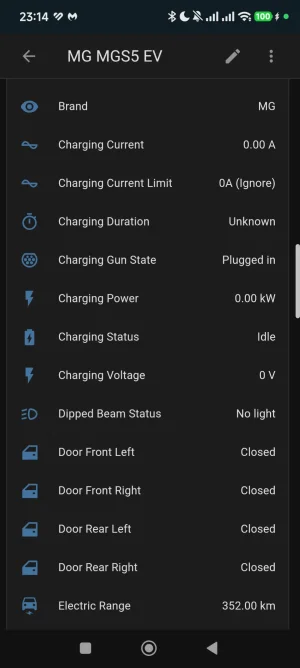
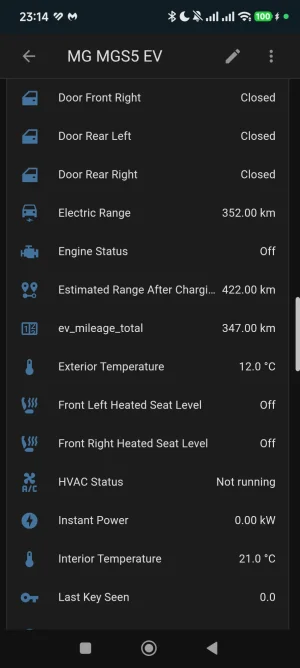
- I can see other stuff like the coordinates for current position, tyre pressures, plug state, and cabin temperature.

It will be interesting to see if this comms method is any more reliable than using iSmart.

I would also like to create some client-side Javascript code for checking SoC, but need to be absolutely sure it will run securely.
 
I use an integration in home Assistant based in this API
 

Attachments

  • Screenshot_2026-01-06-23-15-01-058_io.homeassistant.companion.android.webp
    Screenshot_2026-01-06-23-15-01-058_io.homeassistant.companion.android.webp
    60.5 KB · Views: 29
  • Screenshot_2026-01-06-23-14-54-790_io.homeassistant.companion.android.webp
    Screenshot_2026-01-06-23-14-54-790_io.homeassistant.companion.android.webp
    55.4 KB · Views: 20
  • Screenshot_2026-01-06-23-14-49-433_io.homeassistant.companion.android.webp
    Screenshot_2026-01-06-23-14-49-433_io.homeassistant.companion.android.webp
    53.3 KB · Views: 21
  • Screenshot_2026-01-06-23-14-51-281_io.homeassistant.companion.android.webp
    Screenshot_2026-01-06-23-14-51-281_io.homeassistant.companion.android.webp
    56.4 KB · Views: 20
  • Screenshot_2026-01-06-23-14-42-292_io.homeassistant.companion.android.webp
    Screenshot_2026-01-06-23-14-42-292_io.homeassistant.companion.android.webp
    49 KB · Views: 20
  • Screenshot_2026-01-06-23-14-47-534_io.homeassistant.companion.android.webp
    Screenshot_2026-01-06-23-14-47-534_io.homeassistant.companion.android.webp
    51.6 KB · Views: 25
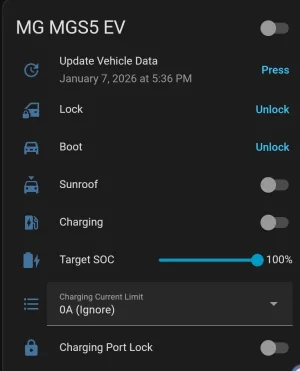
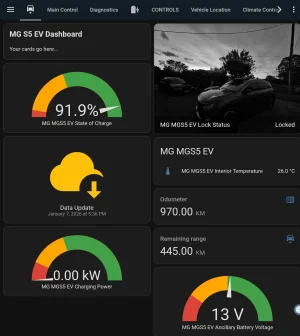
Yes, I think I got the same set-up from git-hub and there are lots of information from the car. I think it's better than the iSmart app but one caveat, it can not issue any command like changing charge rate, adjust SOC etc., But it can issue some basis command like unlock door, open boot etc., Not bad but not perfect.
 

Attachments

  • Screenshot_20260107_202302_Chrome.webp
    Screenshot_20260107_202302_Chrome.webp
    22.3 KB · Views: 17
  • Screenshot_20260107_202012_Chrome.webp
    Screenshot_20260107_202012_Chrome.webp
    116.3 KB · Views: 17
  • Screenshot_20260107_202044_Chrome.webp
    Screenshot_20260107_202044_Chrome.webp
    62.3 KB · Views: 18
Yes, I think I got the same set-up from git-hub and there are lots of information from the car. I think it's better than the iSmart app but one caveat, it can not issue any command like changing charge rate, adjust SOC etc., But it can issue some basis command like unlock door, open boot etc., Not bad but not perfect.
Is it easy to set up? Do I need to know programming to do it? My ismart is very shaky and only works when the mobile network is excellent which is rare where I live. It only works 2 out of 10 times so i need a reliable way to check the basics of the car (remotely turn on/off the ac etc)
 
I'm just looking for a simple monitor, when at home or on the road.

Its looking like I'll run some Python code & WireGuard (VPN) on a RaspberryPi, using this as a server to provide some basic data remotely (simple web page), without the need to log in.

Info may include; Charging Active, SoC, range, charge limit, system battery voltage, tyre pressures.
 
Is it easy to set up
Just need basic knowledge of software functions. But one needs to set up some basic Home Assistant hardware and implement it into your home environment. After that stage. Start asking AI platforms, either Google, Microsoft or any AI platforms, it will guide you with suggestions. And with trial and errors, one will get it working. Try google some tutorials on YouTube and start from there particularly with hardware.

The only issue if you have connection problems. This options would not help your situation as it needs a good connection more than the iSmart app. See if you can improve on that front first.
 
Am I right in thinking that if you use the API for stuff like Home Assistant, the official app is severely limited?
 
Am I right in thinking that if you use the API for stuff like Home Assistant, the official app is severely limited?
Why ? No you make a second account only for HomeAssistant I have 3 accounts created for my car, One for me, one for my wife, and one for Homeassistant
 
Oh, maybe it has changed. The old HA advice was that the app loses the ability to do things like start pre-heating.
 
the app loses the ability to do things like start pre-heating.
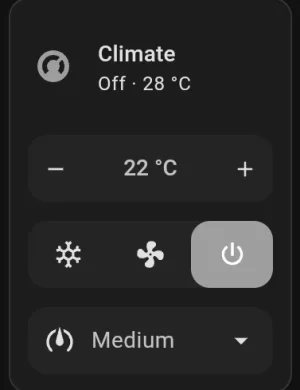
Incidentally I was playing with turning on the AC before jumping into the car as we're summer here with 38°C today with HA, and it worked 👍pity the AC turned off once opening the door but that's issues with how the car is set-up with. But not sure about pre-heating. That I need to wait some 4, 5 months to tell🙂
 

Attachments

  • Screenshot_20260108_180227_Chrome.webp
    Screenshot_20260108_180227_Chrome.webp
    6.1 KB · Views: 4
Incidentally I was playing with turning on the AC before jumping into the car as we're summer here with 38°C today with HA, and it worked 👍pity the AC turned off once opening the door but that's issues with how the car is set-up with. But not sure about pre-heating. That I need to wait some 4, 5 months to tell🙂

Oh wow, I looked at this to start with when I got the car, as I was disappointed that I could not schedule heating. I was put off by the user account thing which it sounds like with additional users, that's sorted, and together with climate control you could easy do a HA automation to schedule heating!

I'm going to give this another look now!
 
Last edited:
I made some progress yesterday, extracting some of the data I need from my S5...

MG-S5-ev-html-display.webp


No joy yet with; Car Status (parked/ready/driving) but this is a nice-to-have, Charge Limit (which needs to be the limit set in car) and Plug status (not sure this is working properly).

And yes, my Efficiency figure is a bit embarrassing. In my defense, we had a long, 275m trip home that was a combination of M-way traffic jams, interwoven with foot down driving. ...could do better!

After a bit more tweaking with this HTML output file, I'll move on to explore the dark art of using the WireGuard VPN.
 
Support us by becoming a Premium Member

Latest MG EVs video

MGS6 deep dive + MG2 rumours, MGS9 PHEV preview and Cyber X tease
Subscribe to our YouTube channel
Back
Top Bottom