Handbook and Service Info

MGS5CJB

Standard Member
Joined
Dec 20, 2025
Messages
25
Reaction score
32
Points
13
Location (town/city + country)
Lincolnshire Alps
Driving
MGS5
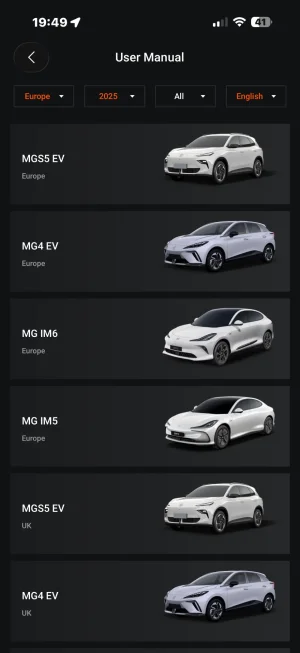
Hello everyone just thought I’d mention that miraculously I checked my I smart app and the owners handbook and service info together with a
Picture of the S5 has now appeared.Not sure exactly when but it’s now there on mine.
😊
 
Hello everyone just thought I’d mention that miraculously I checked my I smart app and the owners handbook and service info together with a
Picture of the S5 has now appeared.Not sure exactly when but it’s now there on mine.
😊
Are you using an Android or Apple phone, what version of software is your ismart App using please.
I am using a IPhone and running on version 3.1.2. and it is the latest update ( according to the App ).
I have no manual or service schedule information showing ( it reports no data to display ).


IMG_2882.webp
 
Hi I smart V3. 1.3. And iPhone 16 pro max on IOS 26.2
My App shows no updates are available.
So I have uninstalled the original App and then closed down my phone.
Restart and then done a fresh down load of the latest ISmart App version V3. 1.3 now.
Had to log back in with my details of course and there is the new look App 👍.
I can see the “user manual” and it works fine now.
But I am unable to see the service schedule anywhere though ?.
Can you please advise - thanks.
Here is what I have now.

IMG_2884.webp


IMG_2886.webp
 
My App shows no updates are available.
So I have uninstalled the original App and then closed down my phone.
Restart and then done a fresh down load of the latest ISmart App version V3. 1.3 now.
Had to log back in with my details of course and there is the new look App 👍.
I can see the “user manual” and it works fine now.
But I am unable to see the service schedule anywhere though ?.
Can you please advise - thanks.
Here is what I have now.

View attachment 42610


View attachment 42611
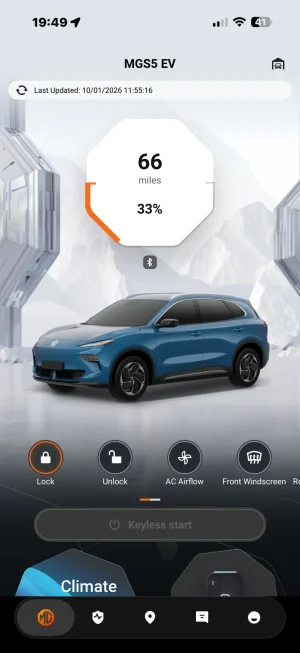
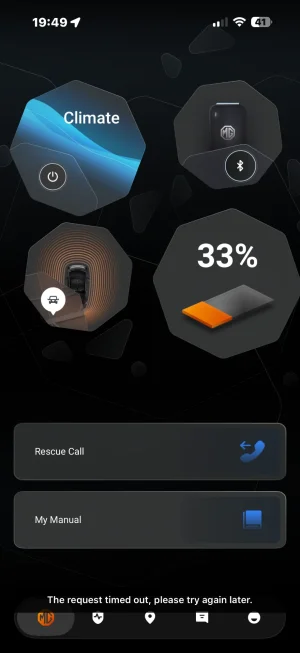
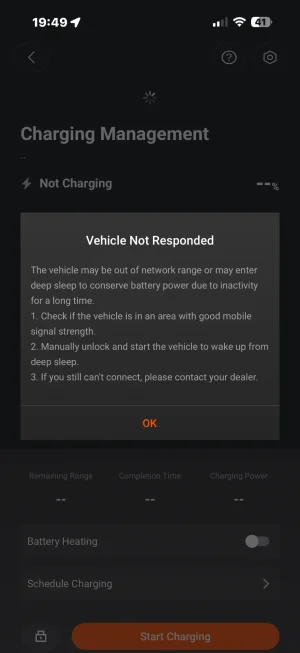
Seem to have lost contact with car it’s gone into deep sleep mode and second manual not showing your updated app also looks different to mine
 
What does your Home Screen look like ?.
Are you on the “100th Year” skin ?.
You can select either in the App ( see photo ).
The App defaults to the “White” skin after downloaded.
If I select the 100th Year skin the user manual is missing.
In the default “white” App the owners manual can be selected from the Home Screen.
I have quickly gone through the manual, that includes technical data etc.
But I can not see any service schedule tab ?.


IMG_2894.webp


IMG_2895.webp
 
Here are some screenshots a nav manual has come up now
What does your Home Screen look like ?.
Are you on the “100th Year” skin ?.
You can select either in the App ( see photo ).
The App defaults to the “White” skin after downloaded.
If I select the 100th Year skin the user manual is missing.
In the default “white” App the owners manual can be selected from the Home Screen.

View attachment 42614


View attachment 42617

What does your Home Screen look like ?.
Are you on the “100th Year” skin ?.
You can select either in the App ( see photo ).
The App defaults to the “White” skin after downloaded.
If I select the 100th Year skin the user manual is missing.
In the default “white” App the owners manual can be selected from the Home Screen.

View attachment 42614


View attachment 42617
Interesting I am on the 100 years skin
 

Attachments

  • IMG_3819.webp
    IMG_3819.webp
    68.4 KB · Views: 13
  • IMG_3821.webp
    IMG_3821.webp
    60 KB · Views: 13
  • IMG_3820.webp
    IMG_3820.webp
    58.4 KB · Views: 12
  • IMG_3818.webp
    IMG_3818.webp
    46.5 KB · Views: 12
Bit of a glitch going on I think ?.
I have just selected the orange 100th Year screen again and the owners manual tab on the home page is now working - how odd ??.
Where does your “ service schedule” live ?🤣.
Is there a “tab” ?.

IMG_2896.webp


IMG_2897.webp
 
Yes some weird glitches and mine still not talking to car so will unlock it in the morning and see if waking it up sorts it out.
It’s not a service manual as such it says services Portfolio which gives some deailed info on operation.
Think I have solved the mystery there are two pictures of the MGS5 and originally I clicked on one which says Europe in small print that’s where the service portfolio is next to the owners manual.
There is then a second picture with UK at the bottom and no service portfolio.
 
Yes some weird glitches and mine still not talking to car so will unlock it in the morning and see if waking it up sorts it out.
It’s not a service manual as such it says services Portfolio which gives some deailed info on operation.
Think I have solved the mystery there are two pictures of the MGS5 and originally I clicked on one which says Europe in small print that’s where the service portfolio is next to the owners manual.
There is then a second picture with UK at the bottom and no service portfolio.
Thanks - You can only wake up the car from its deep sleep, by unlocking with the fob, then open the drivers door and close again and lock with the fob.
Now open the App and it will work again.
I don’t think MG have released a service schedule for the MGS5 just yet.
This has been brought up in another thread and MG CS have been asked the question why ?.
This is why I was curious where you had located it on the App.
Because the version of the App had just been released, it could have been included.
But it appears not 🤷🏻.
 
Hello everyone just thought I’d mention that miraculously I checked my I smart app and the owners handbook and service info together with a
Picture of the S5 has now appeared.Not sure exactly when but it’s now there on mine.
😊
The manual was there a few months back and then disappeared for some reason.
 
Support us by becoming a Premium Member

Latest MG EVs video

MGS6 deep dive + MG2 rumours, MGS9 PHEV preview and Cyber X tease
Subscribe to our YouTube channel
Back
Top Bottom