Driver display MGS5 Trophy clearing past trips mileage etc

mgaz

Standard Member
Joined
Aug 21, 2025
Messages
18
Reaction score
11
Points
10
Location
Lancashire
Driving
MGS5
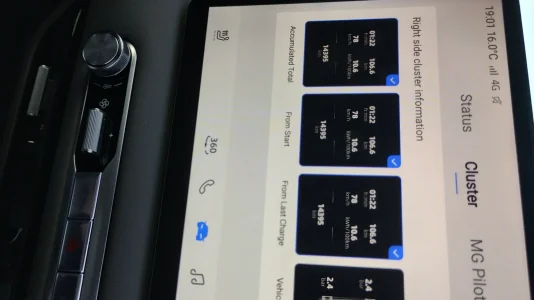
Hi, can't seem to get the since recharge, since start, accumulated mileage, on drivers Speedo screen does not seem to be on drivers screen despite trying all steering wheel buttons, really wanted to reset it all as it's also on main (left)display of car too

Also it states over 14000 kilometres on those screens, when car mileage is only 1500 miles( I know that can never be adjusted)

Any help appreciated being trying a while.
Thanks.
 
You need to select the ones to show on the main screen, select the car icon and it is the second tab possibly status but my memory is shattered after a hard week at work.
The button to use is the screen button to scroll though the different “cards” (middle right side) looks like a large and small window
 
The images on the main screen are there to allow you to select which ones you want on the driver screen.
Thank you Gus and Alb, will try and sort it in a bit but, any idea why those screens show 14000 Kms I think, when car has only done 1500 miles?? Thanks
 
Thanks in the hope it helps someone else in the future, still trying to get one of these like "since charge" to go on steering wheel card menu slot. Will keep trying....
 

Attachments

  • IMG_20250905_190154057_HDR.webp
    IMG_20250905_190154057_HDR.webp
    94.5 KB · Views: 42
Grateful thanks, my problem is getting the 'since charge" window from the main screen on the left to the drivers display(Speedo screen)

on the right

so I can then scroll through the cards and it would be able to scroll to the since charge
with the diagram you have kindly posted.
Thanks
 
Grateful thanks, my problem is getting the 'since charge" window from the main screen on the left to the drivers display(Speedo screen)

on the right

so I can then scroll through the cards and it would be able to scroll to the since charge
with the diagram you have kindly posted.
Thanks
On the main screen, press the car icon at the bottom and select cluster.

What you see here are just examples and allows you to add or remove things that you can scroll through on the cluster (drivers screen).

Make sure “from last charge” is ticked.

IMG_5286.webp


Then on the drivers screen you can move between the ticked screens by pressing this button on the steering wheel.

IMG_5287.webp
 
Support us by becoming a Premium Member

Latest MG EVs video

MGS6 deep dive + MG2 rumours, MGS9 PHEV preview and Cyber X tease
Subscribe to our YouTube channel
Back
Top Bottom