Micropop

Standard Member
Joined
Feb 20, 2026
Messages
78
Reaction score
113
Points
35
Location (town/city + country)
Mo i Rana, Norway
Driving
MGS6
Is it even possible? My phone always automatically connects with WiFi. Even if I turn off WiFi, the car seems to force it on again! Really annoying, as there are glitches now and then in wireless mode, so I think wired would be more stable and better sound.
 
Is it even possible? My phone always automatically connects with WiFi. Even if I turn off WiFi, the car seems to force it on again! Really annoying, as there are glitches now and then in wireless mode, so I think wired would be more stable and better sound.
Ok. I’m Apple to the core and don’t have such issues, but surely issue would be with bluetooth not wi fi?
 
Ok. I’m Apple to the core and don’t have such issues, but surely issue would be with bluetooth not wi fi?
Nope. Android auto is WiFi, not BT. That's the whole point of it. BT is not capable of transmitting the amount of data required. And just test it! Play music through BT, and it's utter crap. With android auto it gets better, but a wired connection is even better. It just sends it out as it is. No conversion or compressing.
But for some weird reason, it seems wireless has preference over wired, which is just very strange!
 
Ok. I’m Apple to the core and don’t have such issues, but surely issue would be with bluetooth not wi fi?
Sort of. When you get in the car it connects via Bluetooth then decides this is a wireless connection and turns on the wifi connection, so if you turn off the bluetooth it won't connect.
 
Sort of. When you get in the car it connects via Bluetooth then decides this is a wireless connection and turns on the wifi connection, so if you turn off the bluetooth it won't connect.
This^^

Wireless AA uses BT to initiate the connection, so delete the car's BT profile from your phone and/or unpair your phone from the car. This might/should prevent AA from connecting automatically. Then just connect via USB. You'll need to leave your phone's BT on to initiate the connection and for voice calls in/out, but all data transfer is via the USB connection.

If this doesn't work, then what you need to do will depend on your AA version... and maybe phone. AA used to have a 'Wireless Android Auto' option in the AA app's settings which you could toggle on/off. If that's available to you then choose this option (toggle off).

However, the more recent versions of AA have removed that option from sight. You have to enter developer mode. So go to AA's app settings and scroll down to 'Version' and tap it until developer mode springs into life. Then tap the three-dot menu (top right?) and select 'Developer Settings'.
Then toggle off 'Wireless Android Auto'.
 
However, the more recent versions of AA have removed that option from sight. You have to enter developer mode. So go to AA's app settings and scroll down to 'Version' and tap it until developer mode springs into life. Then tap the three-dot menu (top right?) and select 'Developer Settings'.
Then toggle off 'Wireless Android Auto'.
Additional info:
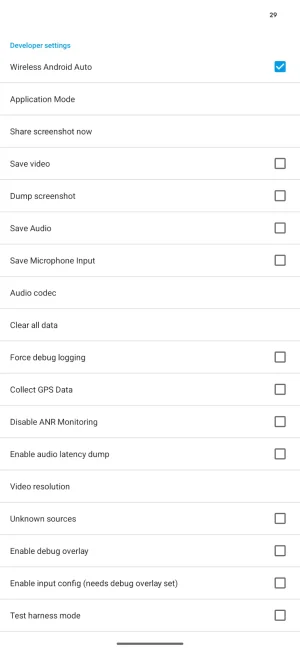
In the latest AA (v 16.1.xxxxxx), to get to 'Version' you have to choose 'Additional settings in the app'. 'Version' is right down the bottom. My Pixel 7 Pro informs me when I'm getting close to being able to enable Developer settings (needs about 10 taps or so). A little screen then pops up 'Allow...' with Cancel/OK options.
Then you actively engage 'Developer settings' (in 3-dot menu; top left right (!) on my phone).
This presents you with the attached screenshot. Toggle 'Wireless Android Auto' right at the top.

Don't forget to 'Close developer mode' (in 3-dot menu) after you've finished.
 

Attachments

  • Screenshot_20260228-102944.webp
    Screenshot_20260228-102944.webp
    37.5 KB · Views: 5
Last edited:
I don't know what the MGS6 is like with wired AA (since wireless worked 'out of the box'). But if it's anything like my MG5 was then potholes (of which there are more of than intact road surface in my area) and strong braking tended to cause the AA to drop out. Presumably this was because my phone would move on the non-slip mat in the centre space and jiggle the connection. I'm not sure the car's usb connection was too good either.
 
Support us by becoming a Premium Member

Latest MG EVs video

MG4 EV Refresh + NEW MG4 EV Urban - UK arrival dates, prices, specs (2026)
Subscribe to our YouTube channel
Back
Top Bottom