Android Auto

PeeDeeBee

Novice Member
Joined
Feb 10, 2025
Messages
12
Reaction score
2
Points
4
Location (town/city + country)
Bedfordshire
Driving
ZS EV
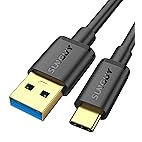
Hi all, had my new to me '21 plate dropped off by the non-MG dealers on Tuesday. I had tried briefly connecting my phone up during the test drive, but it didn't work, so I put it down to possibly being a dodgy charge-only cable, so I'd seen this recommended elsewhere and bought it in readiness: USB cable
That doesn't work, and I'd also ordered an AAWireless TWO dongle, as I'd heard good things about those. I am completely unable to get Android Auto to work with my S21.
I've read numerous other threads that don't have definitive solutions, or it just works with a specific cable perhaps.

I get this problem when I try and use the wireless adaptor too

I've already got my default USB setting to File Transfer.

Once I'd paired my phone via Bluetooth it popped up that Android Auto was available, but it still doesn't get recognised when connected via the cable. AAWireless support have advised that as it doesn't work with my phone connected directly, they can't help me with any troubleshooting either. I'd open a ticket with them just in case they had some font of knowledge regarding the particular quirks of this model perhaps. I've also tried my phone via the AAWireless dongle cable and no joy with that either.
Screenshot_20250226_123645_AAWireless.jpg
 
Last edited by a moderator:
Hi, on my MG5 there are two USB sockets and only one will work with AA.
 
I have only had my MG4 SE for a few days and I have the Same problem, and I connect to the correct USB socket. I have also purchased a good data cable that's not too long.
When I connect the phone to the Android Auto it stays greyed out on the info screen, and no response on my phone.
When I connect my wife's phone it turns black touch that and it says when stationery follow phone;s on screen instructions. ( Both are Samsung phones, one is model A14 & one A16 )
but there are no instructions to follow.
When at Halfords, having a dash cam fitted, the fitter connected his Apple phone and it connected to Carplay instantly.
I phoned my main dealer, and was told to call in tomorrow, and they will take a look...fingers crossed.
 
Last edited by a moderator:
I had a problem when I first got the car. I connected the phone and it said on the MG screen to continue setup on my phone, there was a notification on the phone, but when i tapped on it nothing happened.

In the end I had to go to settings > Apps and find Android Auto, cleared the data and cache and then it worked fine and hasn't been any trouble since, so it was a phone issue. My phone is a Pixel 9.
 
Last edited by a moderator:
We have a AAWireless one, it works completely fine.

This is on the 2.gen though
 
I remember having to try at least 4-5 different USB cables until one worked. After that I got cheap Bluetooth wireless dongle and use that to connect to AA. No problems since.
 
I have only had my MG4 SE for a few days and I have the Same problem, and I connect to the correct USB socket. I have also purchased a good data cable that's not too long.
When I connect the phone to the Android Auto it stays greyed out on the info screen, and no response on my phone.
When I connect my wife's phone it turns black touch that and it says when stationery follow phone;s on screen instructions. ( Both are Samsung phones, one is model A14 & one A16 )
but there are no instructions to follow.
When at Halfords, having a dash cam fitted, the fitter connected his Apple phone and it connected to Carplay instantly.
I phoned my main dealer, and was told to call in tomorrow, and they will take a look...fingers crossed.
Dealer said there is new software and they are going to do it when it goes to the body shop for a small dent they found at the p.d.i. Before I picked up the car....it has to be down loaded from computer and on to a USB stick..They know what they are doing so mid month hopefully all will be good.
 
Dealer said there is new software and they are going to do it when it goes to the body shop for a small dent they found at the p.d.i. Before I picked up the car....it has to be down loaded from computer and on to a USB stick..They know what they are doing so mid month hopefully all will be good.
If you have just had the car delivered part of the PDI would have been to fully update all hardware modules in the car to the latest firmware version.

At least that's what i was told by the Danish dealer I bought from....It is a bulletpoint on their PDI to make sure the MG computer says "All modules are up to date" or something to that effect.
 
Hi all, had my new to me '21 plate dropped off by the non-MG dealers on Tuesday. I had tried briefly connecting my phone up during the test drive, but it didn't work, so I put it down to possibly being a dodgy charge-only cable, so I'd seen this recommended elsewhere and bought it in readiness: USB cable
That doesn't work, and I'd also ordered an AAWireless TWO dongle, as I'd heard good things about those. I am completely unable to get Android Auto to work with my S21.
I've read numerous other threads that don't have definitive solutions, or it just works with a specific cable perhaps.

I get this problem when I try and use the wireless adaptor too

I've already got my default USB setting to File Transfer.

Once I'd paired my phone via Bluetooth it popped up that Android Auto was available, but it still doesn't get recognised when connected via the cable. AAWireless support have advised that as it doesn't work with my phone connected directly, they can't help me with any troubleshooting either. I'd open a ticket with them just in case they had some font of knowledge regarding the particular quirks of this model perhaps. I've also tried my phone via the AAWireless dongle cable and no joy with that either.
View attachment 35116


Hi
I had this problem tried six cables but finally found one that worked immediately
SUNGUY USB C Android Auto Cable 1.5FT, 10Gbps USB C 3.1 Gen 2 Data Transfer, 3A Fast Charging USB A to USB C CarPlay Cable, for iPhone15/15Pro/15Pro Max, iPad Pro, Samsung T7, External SSD


Regards
 
Several folks I know with Samsung phones have had considerable issues connecting to AA in their MG's. Not sure why this is. I do know that a couple of them switched phones to Motorola & got instant AA connection.
 
I use a Samsung with no issues unlike the mg tbox which failed 4 months ago and still isn't fixed
 
Support us by becoming a Premium Member

Latest MG EVs video

MG4 EV Refresh + NEW MG4 EV Urban - UK arrival dates, prices, specs (2026)
Subscribe to our YouTube channel
Back
Top Bottom