Help needed: How to set a charging limit on MG ZS EV 2023 (Long Range)?

Den

Novice Member
Joined
Nov 9, 2025
Messages
2
Reaction score
0
Points
5
Location (town/city + country)
4119
Driving
ZS EV
"Hi everyone! I’m an MG ZS EV 2023 owner based in Australia.

I recently bought this car used, and I have a question regarding the charging options. To maintain battery health, I’ve heard it’s best to keep the charge at around 80% for daily use, unless I’m planning a long trip.

I did some research and found that I should be able to set a charging limit, but I’m having trouble getting it to work. Here’s what I’ve tried so far:

  1. Via the In-car Touchscreen: I tried to toggle the modes in the charging menu, but the screen doesn't respond to my touch.
  2. Via the MG iSmart App: I checked the app settings, but I could only find the "Scheduled Charging" option; there was no slider or toggle for the charging limit.
  3. While Charging: I tried adjusting the settings while the cable was plugged in.
  4. While Not Charging: I also tried it while the car was unplugged and in 'READY' mode.
None of these worked for me. Does anyone know how I can successfully limit the charge to 80%? Is there a specific step I might be missing, or could this be a software version issue? [I also had a software update at the service center about 3 months ago, so I assume I'm on a relatively recent firmware.]

Any advice would be greatly appreciated. Thanks in advance!"

20260316_151520.webp
20260316_150832.webp
20260316_151511.webp


Screenshot_20260316_151956_MG iSMART.webp
Screenshot_20260316_152000_MG iSMART.webp
 
If you drag the left side of the top blue line to the right, it should slide to maximum charge to a higher to 90 or 100%

The schedule allows you to set the time of day that you charge the car, we have 5kw of solar so if I schedule to charge during daylight hours, it should charge from the solar. This also means that it will take longer to charge so I have turned it off.
 
"Hi everyone! I’m an MG ZS EV 2023 owner based in Australia.

I recently bought this car used, and I have a question regarding the charging options. To maintain battery health, I’ve heard it’s best to keep the charge at around 80% for daily use, unless I’m planning a long trip.

I did some research and found that I should be able to set a charging limit, but I’m having trouble getting it to work. Here’s what I’ve tried so far:

  1. Via the In-car Touchscreen: I tried to toggle the modes in the charging menu, but the screen doesn't respond to my touch.
  2. Via the MG iSmart App: I checked the app settings, but I could only find the "Scheduled Charging" option; there was no slider or toggle for the charging limit.
  3. While Charging: I tried adjusting the settings while the cable was plugged in.
  4. While Not Charging: I also tried it while the car was unplugged and in 'READY' mode.
None of these worked for me. Does anyone know how I can successfully limit the charge to 80%? Is there a specific step I might be missing, or could this be a software version issue? [I also had a software update at the service center about 3 months ago, so I assume I'm on a relatively recent firmware.]

Any advice would be greatly appreciated. Thanks in advance!"
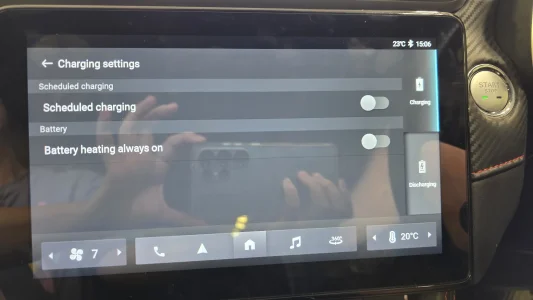
View attachment 44366View attachment 44368View attachment 44367


View attachment 44369View attachment 44370
In iSmart App, Charging page, gear wheel top right. Totally not intuitive that it isn't in the Schedule Charging page.
1773648482443.webp
1773648511548.webp
 
I suspect that you might actually have the Standard Range MG ZS EV, which has an LFP battery.

This one does not allow you to set the charge limit to "Battery Health Mode" or "Long Range Mode".

This is much less important on the LFP, and it's on the MG ZS EV Long Range (has an NMC battery) that you should only charge to 100%

You're meant to charge to 100% on the Standard Range often, as it helps the BMS calculate the actual battery percentage.

LFP battery voltage curves are very flat, and the charging from low -> 100% helps the car know how much energy you actually have.
 
If you drag the left side of the top blue line to the right, it should slide to maximum charge to a higher to 90 or 100%

The schedule allows you to set the time of day that you charge the car, we have 5kw of solar so if I schedule to charge during daylight hours, it should charge from the solar. This also means that it will take longer to charge so I have turned it off.
Thank you for your answer.
 
Looking at your screen photo you do appear to have the long range trophy.
Simply toutch the green bar which is normally set to 80% and slide it to the right which should then set it to 100%. If this doesn’t work I suggest taking it back to your MG dealer. Hope this helps.
 
Looking at your screen photo you do appear to have the long range trophy.
Simply toutch the green bar which is normally set to 80% and slide it to the right which should then set it to 100%. If this doesn’t work I suggest taking it back to your MG dealer. Hope this helps.
I am intrigued that the owner hasn't said which one they have :)

My maths was looking at the range, the percentage, and then having a guess at the capacity.

77% of 360km (the range of the 51kwh Standard!) is 277km... So, guaranteed it's the Standard range with the LFP, and therefore they can't select the health mode.

The bar is therefore just an indicator of where to keep your charge, and you can't force it to stop at 80%.

I wish it could, though!
 
Although the standard range and the long range share the same head unit display, the standard range with the LFP battery chemistry is better suited to charging to 100% SOC every time to conduct a charging cycle.
Therefore, the charging to 80% is not available for the standard range models.
LFP batteries have a problem reporting the predicted range with some type of accuracy, when charging to 80% SOC.
So charging to 100% each and every time the car is car is charged, is advised.
The long range NMC chemistry packs differ in this respect, as charging to 80% for shorter daily driving IS advised and charging to 100% SOC for taking on longer mileage trips.
This is why the option to select the charging percentage IS offered.
Don’t rely on what options the head unit screen appears to be offering you.
You need to establish if you do in fact have either a standard range or a long range model.
If you are unable to select the charge to 80% SOC option in the head unit, then it’s looks very likely that you have the standard range model and not the long range model here.
The advertised WLTP range for the long range at 100% SOC should be 273 miles in the UK.
 
Last edited by a moderator:
Support us by becoming a Premium Member

Latest MG EVs video

MG4 EV Refresh + NEW MG4 EV Urban - UK arrival dates, prices, specs (2026)
Subscribe to our YouTube channel
Back
Top Bottom

