
Everest
Prominent Member
I think a swipe left is used as a "turn-off"... so a friend told meHow do I do it please. Swipe from home screen then what?


I think a swipe left is used as a "turn-off"... so a friend told meHow do I do it please. Swipe from home screen then what?

Yes just swipe down from the home screen, then press 'Power Off', then 'Confirm'.How do I do it please. Swipe from home screen then what? I've figured out pressing car image on screen then status then power off. Press brake to turn on again
Thanks, a separate icon to turn screen off which then shows clock, and music/radio turned off separately?Yes just swipe down from the home screen, then press 'Power Off', then 'Confirm'.
The 'Screen Off' just turns the screen off, and shows the Clock (if it's been set to show the Clock), but it doesn't turn the power and lights off.Thanks, a separate icon to turn screen off which then shows clock, and music/radio turned off separately?
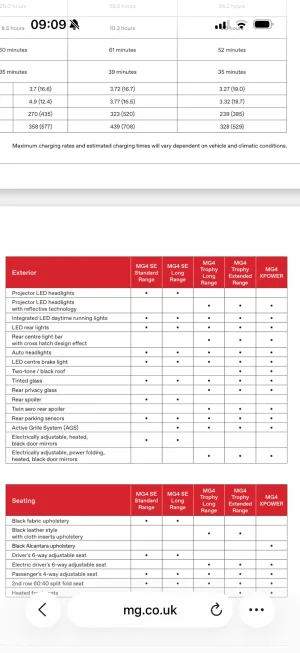
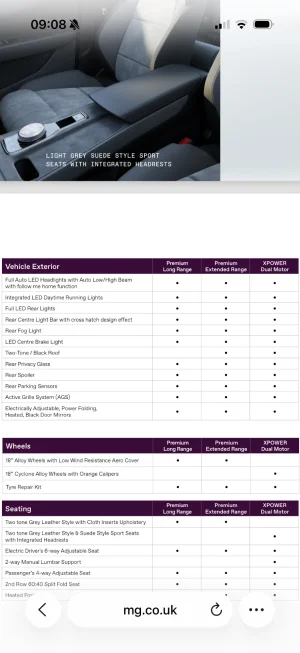
Are the tail lights full LED now, indicators and reverse lights?The spoiler is definitely the only noticeable difference, but in fact the headlights are different as well, they're a slightly darker tint, and the tail lights no longer have SAIC VISION written on them.
I believe the indicators and reverse lights are bulbs, but I'll have to check the car to be sure.Are the tail lights full LED now, indicators and reverse lights?
The brochure would certainly seem to indicate that they are.
It’s the wording in the brochures that made me think they might be full LED now.I believe the indicators and reverse lights are bulbs, but I'll have to check the car to be sure.
* * EDIT * * I've just looked at the brochure and it says "Full LED Headlights & DRL & Rear Lights", so that won't include the reverse and indicator lights.

Swipe down, tap "Power off", done.How do I do it please. Swipe from home screen then what? I've figured out pressing car image on screen then status then power off. Press brake to turn on again
The relevant page of the 2026 manual:-It’s the wording in the brochures that made me think they might be full LED now.
“Full LED rear lights” as opposed to just “LED rear lights”.
View attachment 45118View attachment 45119

I'm assuming you are referring to the inbuilt sat nav?Does the sat nav re route or offer a faster route whilst in use? It seems to say either route will take longer or shorter due to traffic
Yes it re-routes you if you take a wrong turn, first it'll ask you to make a U-turn if possible, but when you've travelled a but further, it provides an alternative,Does the sat nav re route or offer a faster route whilst in use? It seems to say either route will take longer or shorter due to traffic
Android auto via the cars infotainment system?I'm assuming you are referring to the inbuilt sat nav?
If so, I cannot say as I use Android auto. However, I'm sure others will be able to help you.
I meant if there's traffic on the route does it offer a faster alternative?Yes it re-routes you if you take a wrong turn, first it'll ask you to make a U-turn if possible, but when you've travelled a but further, it provides an alternative,
Even the manual is incorrect. The front direction indicators are LED. They were only bulbs on SE models, of which there is no 2026 equivalent.
I connect my phone using Bluetooth, choose Android auto on the main screen and then use Google maps in the main, but occasionally Waze for sat nav.Android auto via the cars infotainment system?
I meant if there's traffic on the route does it offer a faster alternative?

Does the rear window have a wash function?At least I now know why the rear wiper comes on every so often when it's raining, I'm so used to having the windscreen washers as the push button on the end of the wiper stalk
T1 Terry





