Things I have learned about the S6 today.

So technically it should automatically reset after a charge regardless of how much the charge is? I will give it a manual reset.
I've honestly no idea how it works! It's consistently inconsistent! Sometimes it resets automatically, sometimes not, and I have no idea what actually triggers it. Usually it does not reset when I charge at home, but the few times I've used DC chargers, it has reset. But yesterday, when I used a DC charger, it did not reset. It was only a quick top up of 12kw. When I got home I had 13% SoC, so I plugged it in immediately, as I needed to drive a bit later.
Only charged for a couple of hours, adding 10kw, and to my surprise, NOW the "since last charge" had reset!
Seems to be totally random whether it resets or not! 🤔😵‍💫
 
I've come to learn that it's seems there is no "connection" whatsoever between the navi and the car itself when it comes to predicting range and what SoC you will arrive with. The navi is outright useless in that matter! I had 54% SoC when I was about to travel 180km. Car said I had 220km range, which is about right, but the navi predicted I would arrive with 25% SoC! Simple math says that the navi thinks the car would have a total range of 620 km, which is almost 28% more than the wltp range of 485.
And it kept on with similar range prediction until the actual SoC was about to reach the navi's predicted SoC at arrival.
Absolutely ridiculous. A lot of room for improvement in that departement!

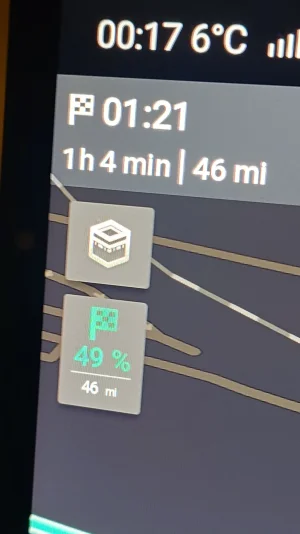
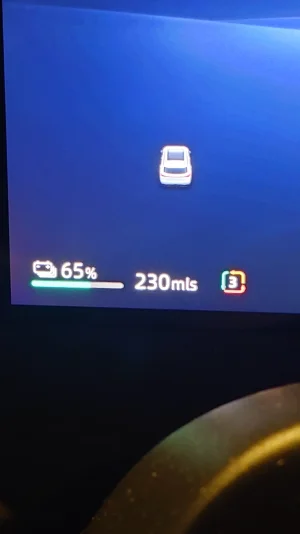
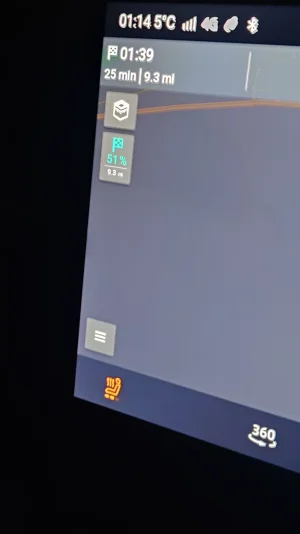
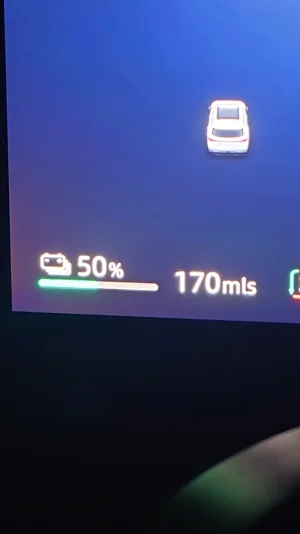
I went for a longer drive yesterday and on my way back used MG navigation to see how that works...
Anyway, it showed me my SoC would be 49% at arrival to my destination, then half way through went to 50% then towards the end at 51% and then down at 50%. I arrived with exactly 50% left. So mine was very accurate and it definitely took into account my driving style. As for the range, that doesn't bother me much since it changes every time you press the accelerator a bit harder ... 🙂
 

Attachments

  • 20260422_001725.webp
    20260422_001725.webp
    142.3 KB · Views: 25
  • 20260422_001735.webp
    20260422_001735.webp
    55.2 KB · Views: 25
  • 20260422_011402.webp
    20260422_011402.webp
    48.7 KB · Views: 24
  • 20260422_013533.webp
    20260422_013533.webp
    63.6 KB · Views: 20
Last edited:
I went for a longer drive yesterday and on my way back used MG navigation to see how that works...
Anyway, it showed me my SoC would be 49% at arrival to my destination, then half way through went to 50% then towards the end at 51% and then down at 50%. I arrived with exactly 50% left. So mine was very accurate and it definitely took into account my driving style.
Thats what I've been finding hence I don't mind giving up my up till now preferred mapping software, it's a very good format IMPO.
 
I went for a longer drive yesterday and on my way back used MG navigation to see how that works...
Anyway, it showed me my SoC would be 49% at arrival to my destination, then half way through went to 50% then towards the end at 51% and then down at 50%. I arrived with exactly 50% left. So mine was very accurate and it definitely took into account my driving style. As for the range, that doesn't bother me much since it changes every time you press the accelerator a bit harder ... 🙂
As long as it is relatively flat and not windy, it's somewhat in the ballpark. But it certainly does not take elevation and/or weather into the equation, as many other navi systems do.
 
Another thing I have noticed, is wind noise and whistling when going at around 85kph and above. Seems to be coming from the mirrors or the top corner of the front door, by the B-pillar. Hard to tell, but it's a rather annoying whistle sound.
 
Things I learned today, after 6 weeks ownership, is that all the windows close automatically when you lock the car and walk away. No need to long press the remote, just lock the car 😎
 
Things I learned today, after 6 weeks ownership, is that all the windows close automatically when you lock the car and walk away. No need to long press the remote, just lock the car 😎
You can turn this function on or off in the settings, just in case you need to leave a window open when you lock the car.
 
Why change the regen? It's more efficient to let the car roll as freely as possible. That also forces you more to use the brakes, so you don't risk the problem with break discs and pads rusting. You get the added benefit of regen when braking anyway.
Light braking does not use the brakes. It's only regen anyway. Just watch the "power meter" while braking.
 
You can turn this function on or off in the settings, just in case you need to leave a window open when you lock the car.

There is also an option in the phone app, one click to open all windows slightly for ventilation.
 

Attachments

  • Screenshot_20260503-114657~2.webp
    Screenshot_20260503-114657~2.webp
    61.2 KB · Views: 20
Oh joy!
Neither our Sportage or Tucson PHEV's were able to RETAIN the Scheduled Charge Time, having to be reset every time. Yet perversely they also needed TWO Set Departure Times to be st.... Despite vociferous complaints they couldn't fix it - yet the Departure Time was ALWAYS retained. With only a 14kWh battery it needed charging at least every other day. We've had our S6 a week, and put 40kWh in last week and another 25% to go in tonight. What bliss to find the off peak charging times retained!
I've also worked round power to headrest fans for our dogs in the boot. A 3m cable from a rear socket down the console under a mat, up to the single seat squab which lifts enough to pay the cable to the door frame, feed it through to the boot. A female to female USB adapter, a double split USB and each fan connected. It's a lot easier to position all the fitting with the single seat down, then repeat with the other seat. I actually cheated with a 4 way USB splitter in case I want other items in boot (rear dashcam or whatever). It doesn't compensate for a 12V boot socket, but it does get power where I want it!
 
Is there a way to have the headlights on, when it's not dark outside? Sounds like a dumb question, but...when I turned the headlight switch to 'on' from 'auto' during the daytime - no headlights.

I got a 'bonggg' telling me my headlights are on - but they're not. I just wanted to check the levelling but do I have to put a cloth over the sensor to fool the car into thinking it's dark?
 
Is there a way to have the headlights on, when it's not dark outside? Sounds like a dumb question, but...when I turned the headlight switch to 'on' from 'auto' during the daytime - no headlights.

I got a 'bonggg' telling me my headlights are on - but they're not. I just wanted to check the levelling but do I have to put a cloth over the sensor to fool the car into thinking it's dark?
Haven't checked that on mine. But kind of defeats the purpose of having the switch there in the first place if it doesn't actually turn on the lights!
 
Is there a way to have the headlights on, when it's not dark outside? Sounds like a dumb question, but...when I turned the headlight switch to 'on' from 'auto' during the daytime - no headlights.
This doesn’t sound right so I just went to check as it is still bright outside. Headlights came on perfectly when headlights switched to on.

Make sure the stalk switch is turned to dipped beam (second notch) and not on side lights (first notch).
 

Attachments

  • IMG_6251.webp
    IMG_6251.webp
    284.8 KB · Views: 20
  • IMG_6252.webp
    IMG_6252.webp
    117 KB · Views: 20
This doesn’t sound right so I just went to check as it is still bright outside. Headlights came on perfectly when headlights switched to on.

Make sure the stalk switch is turned to dipped beam (second notch) and not on side lights (first notch).
Sooooooo....if you have your key with you, it works. I went out just, sans clé and no. Went into the house, picked up the key et voila!

Headlights now adjusted.
 
Aaarrggghhhh - charging balls! I learned this weekend with the first use of my home charger that the car and it's app are nuts.

I plugged the car in on Sat. night, set the Pod app to prioritise cheap rate and set the charge limit to 80%. The car was 38% so only needed 35kWh max (compensating for stuff).

Car app said it would be done by 02:30 from 00:30 - hmmmm, nope. Pod app suggested I change my settings as it wouldn't be able to give me the full charge before 07:00....OK..

The car pipes up to Pod and tells it that it needs 71kWh to get to 80% - sorry car, 80% of 77kWh is 61.6kWh - and that starting at 38% doesn't mean I need 71kWh - it's 38 not 8%.

Charging completed at 05:34 (thanks to my neighbours I saw it stop).

Why did the car think it needed 71kWh?, why did it think that it could get all that in 2 hrs?

Is it me, my S6, Pod, iSmart or what?
 
Aaarrggghhhh - charging balls! I learned this weekend with the first use of my home charger that the car and it's app are nuts.

I plugged the car in on Sat. night, set the Pod app to prioritise cheap rate and set the charge limit to 80%. The car was 38% so only needed 35kWh max (compensating for stuff).

Car app said it would be done by 02:30 from 00:30 - hmmmm, nope. Pod app suggested I change my settings as it wouldn't be able to give me the full charge before 07:00....OK..

The car pipes up to Pod and tells it that it needs 71kW to get to 80% - sorry car, 80% of 77kW is 61.6kW - and that starting at 38% doesn't mean I need 71kW - it's 38 not 8%.

Charging completed at 05:34 (thanks to my neighbours I saw it stop).

Why did the car think it needed 71kW?, why did it think that it could get all that in 2 hrs?

Is it me, my S6, Pod, iSmart or what?
Never even bothered to check with the car. Do all settings on the Zaptec charger. Car doesn't know what charge speed the charger is set at or anything else, so it can't predict correctly when it's finished. Another thing that bugs me a bit. The MGS6 does not support smart charging for some reason. MG is listed as a brand that do support it, but not the MGS6.
 
Aaarrggghhhh - charging balls! I learned this weekend with the first use of my home charger that the car and it's app are nuts.

I plugged the car in on Sat. night, set the Pod app to prioritise cheap rate and set the charge limit to 80%. The car was 38% so only needed 35kWh max (compensating for stuff).

Car app said it would be done by 02:30 from 00:30 - hmmmm, nope. Pod app suggested I change my settings as it wouldn't be able to give me the full charge before 07:00....OK..

The car pipes up to Pod and tells it that it needs 71kW to get to 80% - sorry car, 80% of 77kW is 61.6kW - and that starting at 38% doesn't mean I need 71kW - it's 38 not 8%.

Charging completed at 05:34 (thanks to my neighbours I saw it stop).

Why did the car think it needed 71kW?, why did it think that it could get all that in 2 hrs?

Is it me, my S6, Pod, iSmart or what?
Being in NI we don't have any smart charging even though I'm future proofed if we do and I want to use them, I just plug in with the car set to the required %, if the weathers good as it is at the moment the Zappi harvests and feeds it to the car, if it needs more it will get it over night on th cheap tariff, never had a problem.
 

Latest MG EVs video

MG4 EV Refresh + NEW MG4 EV Urban - UK arrival dates, prices, specs (2026)
Subscribe to our YouTube channel
Support us by becoming a Premium Member
Back
Top Bottom