Front USB ports

Hugo A Go Go

Established Member
Joined
Jul 6, 2025
Messages
90
Reaction score
121
Points
38
Location (town/city + country)
scotland
Driving
MGS5
Hi,

I took an S5 for a test drive today and have now ordered a Trophy LR in blue.

One thing I noticed during the test drive was that the front USB ports as well as the 12v outlet are in the storage bin under the centre arm rest.

When we are on a long road trip, my wife likes to charge her phone whilst using it (don’t worry, she will be the passenger whist I drive).

Is there a way to route a USB cable out of the middle console, or will we just have to close the lid on the cable?

I had a quick look and couldn’t see a space anywhere for a cable to come out of, but we only had an hour and there was so many things to look at!
 
If it is like my Lexus, the lead will have room when the lid is closed. Worth checking from someone on here who has one though!
 
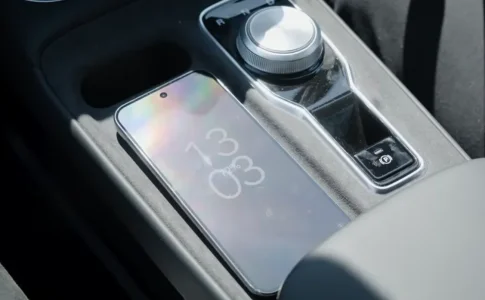
It has a wireless charging pad on the centre console.
charging.webp
 
It has a wireless charging pad on the centre console.
Hi, yes I did see that and I’ll probably use that for myself.

But my wife likes to play with her phone and charge it at the same time so really needs to plug a cable in.
 
Hi, yes I did see that and I’ll probably use that for myself.

But my wife likes to play with her phone and charge it at the same time so really needs to plug a cable in.
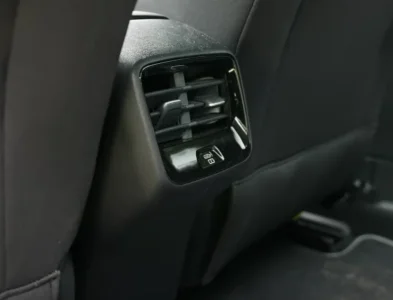
It might be easier for her to plug it into the one in the rear of the car.
rear usb.webp
 
There’s room for the cable to peek out under the lid, you’d need a longer cable to allow it to reach the hands/lap of the passenger comfortably?
Many thanks for confirming this. Yes we will be sure to get a cable slightly longer than standard provided ones.
 
I do exactly this, I have a 0.5m usb c to usb c cable it is just a bit too short. The phone gets really hot on the wireless charger so I tend to prefer the cable charge and drop the phone in the phone stand slot.
 
There is a USB port in the passenger side rearview mirror mount that I’m using to power my dashcam.

1751870715220.webp
 
Hi,

I took an S5 for a test drive today and have now ordered a Trophy LR in blue.

One thing I noticed during the test drive was that the front USB ports as well as the 12v outlet are in the storage bin under the centre arm rest.

When we are on a long road trip, my wife likes to charge her phone whilst using it (don’t worry, she will be the passenger whist I drive).

Is there a way to route a USB cable out of the middle console, or will we just have to close the lid on the cable?

I had a quick look and couldn’t see a space anywhere for a cable to come out of, but we only had an hour and there was so many things to look at!
Hi - we have been proud owners of our MG S5 for 3 months now. There is plenty of room for cord to come out of storage box without squashing cord while charging phone - used it myself. Cheers from Coffs Harbour Aussie
 
Hi all,
I've just installed a Nextbase 522GW in my S5 using the USB port behind the mirror. I need to faff around with the position to get a better view out of the back using the add-on cabin camera but one thing that confused me was that even while sat in the driver's seat with the car in 'Ready' mode, the dash cam kept turning itself off saying it was low on battery. The dash cam itself probably needs another full charge but I was expecting it to simply stay on using the power from the USB port but it kept turning off. Am I missing something?
 
Hi all,
I've just installed a Nextbase 522GW in my S5 using the USB port behind the mirror. I need to faff around with the position to get a better view out of the back using the add-on cabin camera but one thing that confused me was that even while sat in the driver's seat with the car in 'Ready' mode, the dash cam kept turning itself off saying it was low on battery. The dash cam itself probably needs another full charge but I was expecting it to simply stay on using the power from the USB port but it kept turning off. Am I missing something?

I use an action cam as a dashcam, they recommend you remove the battery altogether when using it this way. No idea if the same would apply to your nextbase but maybe it's worth a try.
 
Hi all,
I've just installed a Nextbase 522GW in my S5 using the USB port behind the mirror. I need to faff around with the position to get a better view out of the back using the add-on cabin camera but one thing that confused me was that even while sat in the driver's seat with the car in 'Ready' mode, the dash cam kept turning itself off saying it was low on battery. The dash cam itself probably needs another full charge but I was expecting it to simply stay on using the power from the USB port but it kept turning off. Am I missing something?
Does the dash-cam work without the add-on cabin camera attached?

I have the 322GW powered from the rear view mirror USB and on its own it works OK but when I attach the add-on rear camera the rear camera doesn't work. I suspect the USB socket hasn't enough power to use both.
 
Does the dash-cam work without the add-on cabin camera attached?

I have the 322GW powered from the rear view mirror USB and on its own it works OK but when I attach the add-on rear camera the rear camera doesn't work. I suspect the USB socket hasn't enough power to use both.
I'll check this later as if that's the case I'm sending it back. The dash cam, not the car.
 
A quick question to my imaginary friend, returned the AI answer that the Nextbase 522GW draws 1.5A. (...that equates to 7.5W)
Yikes! ...that seems high, if the answer is accurate.
So adding a rear camera will probably push it over the 2A USB limit.

Just for info: My bog standard iZeeker dash-cam draws 450mA (2.25W) at start up, then drops to 330mA (1.65W) when the screen blanks; its normal running state.
 
A quick question to my imaginary friend, returned the AI answer that the Nextbase 522GW draws 1.5A. (...that equates to 7.5W)
Yikes! ...that seems high, if the answer is accurate.
So adding a rear camera will probably push it over the 2A USB limit.

Just for info: My bog standard iZeeker dash-cam draws 450mA (2.25W) at start up, then drops to 330mA (1.65W) when the screen blanks; its normal running state.
I think the USB port is 20w (10v @ 2 amps) so that should be more than enough but I guess you could be right, the cabin camera add-on might be demanding too much power. I charged it up last night so I'll check it later and see if it works then.
 
Support us by becoming a Premium Member

Latest MG EVs video

MG4 EV Refresh + NEW MG4 EV Urban - UK arrival dates, prices, specs (2026)
Subscribe to our YouTube channel
Back
Top Bottom