[Guide] DIY Tesla Compatibility Update for MG5

Hello, I've fallen at the first hurdle with this... I've download the version of SIPS from the Google drive, but it then asks for a password to extract the file. I've guessed at MGmotor1234@ as shown in one of the images above. However, I then get an error saying "this app can't run on your PC". Any ideas what I might be doing wrong? Thanks
Password is "SIPS" - with the correct password this should extract and run fine.
 
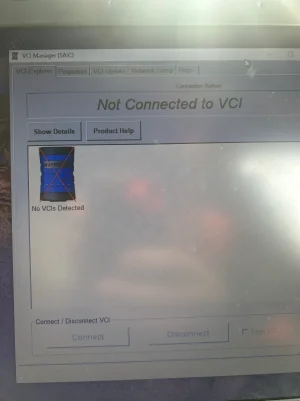
I’ve downloaded the VCI manager and am connected via USB to my laptop, but it doesn’t show as being online. I’ve tried a couple of different cables and reinstalled the software. Also applied the first hot fix from the Google drive, but the other two are blocked from opening. I wanted to test this worked before paying for the subscription, but do I need to have the subscription active for the VDI tool to connect? Thank you
 

Attachments

  • image.webp
    image.webp
    514 KB · Views: 20
Pretty sure mine popped up straight away. Do you get a light on the VNCI and the windows connection sound when you plug/unplug? Is there a driver install in the download folder?
 
I can see it in device manager, but under network adapters (rather than under USB devices). Couldn’t see a driver file in the Google drive but I’ve tried a few different ones from the net. Still no joy. Not really sure where to go next…
 
The adapter is ethernet over usb that's why it comes up in networking
Drivers are installed as part of the VDI manager

If you're using Vnci it's best to also install Vnci manager and check for updates

If Vnci is up to date and VDI manager still doesn't see it then it might be your firewall, to test it disconnect from the internet (turn off WiFi / unplug ethernet cable), disable firewall, check if it connects, if it does then you need to add software exception (allow app in Windows firewall) try again with firewall back on, if it works then reconnect internet

Firewall is your network security so disconnecting from the internet is for safety purposes, if you wish you can do the previous checks still connected to the internet

If you are still having issues then it might be worth having a read the the thread linked in the first post, others have had issues and rectified it, unfortunately I can't remember which pages and there's now 40 something pages
 
Last edited:
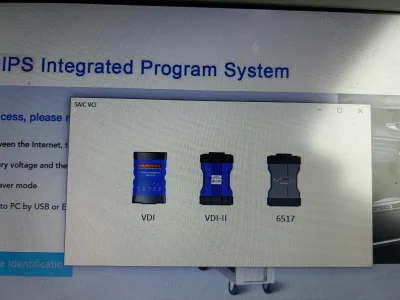
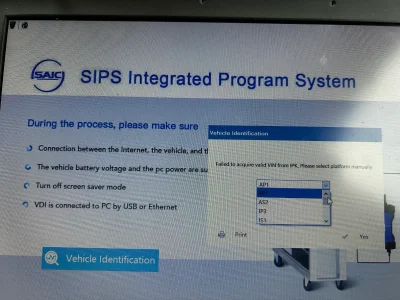
Thanks all for your help with this. I’ve made some progress today, although not entirely sure how! I’ve managed to get the VDI to connect, and am logged into SIPS, however it won’t identify the vehicle. It gives me these options, but I’m not sure which options to choose. I’ve manually entered the VIN which gives me some data, but won’t then let me update anything.
 

Attachments

  • IMG_6758.webp
    IMG_6758.webp
    769.6 KB · Views: 15
  • IMG_6757.webp
    IMG_6757.webp
    824.7 KB · Views: 20
I've had that come up a couple of times and it worked selecting VDI and VDI2, not tried the 3rd option
Never manually entered vin, always auto found and then checked all the modules
 
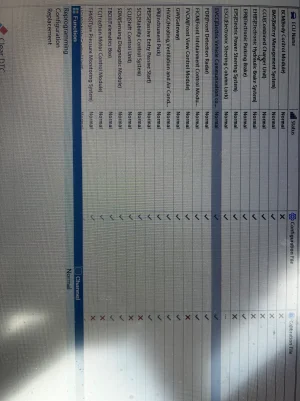
Thanks @haloweenhamster for all your help. I managed to get the ECC updated this morning. I’d bent one of the pins on the VDI device, once straightened it connected and recognised the car properly. Planning to test it tomorrow. One final question… is it worth updating any of the other modules while I still have a valid subscription.
 

Attachments

  • IMG_6762.webp
    IMG_6762.webp
    852.3 KB · Views: 15
Thanks @haloweenhamster for all your help. I managed to get the ECC updated this morning. I’d bent one of the pins on the VDI device, once straightened it connected and recognised the car properly. Planning to test it tomorrow. One final question… is it worth updating any of the other modules while I still have a valid subscription.
The CCU update is also useful in my experience as I've noticed better reliability when starting a charging session on other chargers.
 
Hello,
Thanks to all who have spent time putting this guide together.
I successfully carried out the EVCC update to allow for charging using the Tesla super charger in the UK on MG5 EV LR PFL.

I bought the VDI3 tool from Alibaba https://www.alibaba.com/x/1lAM8ZU?ck=pdp which took just over a week to be delivered.
A Windows laptop with fresh install of windows.

Problem 1
1. Not connected to VCI - The VDI tool connected initially via USB its network device name in my installation was Network 2.
2. During SIPS installation I selected the VDI tool network device which reconfigured it — renamed to network 3 which broke the connection to VCI Manager

Solution
1. Edit windows registry and delete network 2 / 3 - this youtube video shows where to go
2. In addition to above I also reset network setting in windows and restarted PC.
3. The VDI tool was renamed back to network 2 and connection to VCI manager was restored.

Problem 2
1. EVCC reprogramming failed error message “Unknown error. Please contact TAC”
Solution
1. VNCI Device Manager - update firmware of VDI tool from 0.0.0.0 to 1.0.0.9
 
Support us by becoming a Premium Member

Latest MG EVs video

MG4 EV Refresh + NEW MG4 EV Urban - UK arrival dates, prices, specs (2026)
Subscribe to our YouTube channel
Back
Top Bottom