Australian ZS EV 2022+ Maps and Software versions - What does everyone have?

doubledroz

Standard Member
Joined
Feb 28, 2026
Messages
21
Reaction score
11
Points
8
Location (town/city + country)
Adelaide, Australia
Driving
ZS EV
Hi all,

I'm trying to get some information about everyone's software and map versions for their gen 2 or mk 2 MG ZS EVs

I've got a 2022, and I'll have the 80,000km service soon, and wanted to come armed with some information so I can request things if need be.

From checking out the various forums across the internet, the Aus/NZ version seems to have been absolutely forgotten.

Here're my version numbers:

MPU software version:
SWI91-22958-1100R05

MCU software version:
91.1.0.5

Navigation Version:
6.2.60.1.40407-P

Map Data Version:
HERE_ANZ_21Q4 202112231738

I'm mostly concerned about the maps, as there has been lots that has changed, specifically charging infrastructure - mine are clearly from 2021, Q4

I know that I can use Google Maps / Waze, but I just want to see if there has been any support at all for this car since it launched.

I'd also love to know if there have been any infotainment updates, as there are some funny things going on with bluetooth every now and then that could perhaps have been updated.

Can some other fellow Aussies add in what versions they have? All this info can be found either in the settings for the car itself, or in the maps info section.

Cheers
 
I know that I can use Google Maps / Waze,
I should not have to use third party maps. I bought a car that has a GPS system as part of the equipment. As such I expect it to be able to be upgraded on a regular basis.
 
I should not have to use third party maps. I bought a car that has a GPS system as part of the equipment. As such I expect it to be able to be upgraded on a regular basis.
Absolutely @JimJ !

Which software and map versions are you on, assuming you're on a gen2 MG ZS ?
 
@doubledroz
We have a 2023 ZS EV purchased in early January.
The maps are certainly our of date.

MPU software version:
SWI106-29958-1100R12

MCU software version:
114.1.5.0

Navigation Version:
6.2.60.1.45160

Map Data Version:
HERE_ANZ_22Q4 20230100326

Hope that helps.
Lets know if you find that there are later versions
 
MPU software version:
SWI106-29958-1100R12

MCU software version:
114.1.5.0

Navigation Version:
6.2.60.1.45160

Map Data Version:
HERE_ANZ_22Q4 20230100326
Thank you so much @JimJ ! This is the first confirmation I've seen of another version of the software and maps - did you get this updated during a service, or did this come as stock?

A follow up question - do you have the 51kWh, or the Long Range 72.6 kWh version? It might explain the difference in versions if there in fact have not been any updates for the 2022+

I've attempted to get the Australian maps updated myself using Naviextra Toolbox, but it seems to be a dead end.
 
Usually MAP updates can be downloaded from MG's site, does MG not have a Australian site to download from ?

I know its a longshot but have you tried the Europe site and just entered your VIN?

I know it's a longshot but if you haven't tried, maybe give it a spin.

The way to update maps is to download them, put them on a USB stick and put that into the USB port and start the update via the screen.

When I enter my VIN on this site i get the option to download the maps for my car, most likely you will see a European version though, but as said...Costs nothing to check it out.

 
Usually MAP updates can be downloaded from MG's site, does MG not have a Australian site to download from ?

I know its a longshot but have you tried this europe site and just enterede your VIN.

I know it's a longshot but if you havent tried, maybe give it a spin.

The way to update maps is to download them, put them on a USB stick and put that into the USB port and start the update via the screen.

When i enter my VIN on this site i get the option to download the maps for my car, most likely you will see a european version though, but as said...Costs nothing to check it out.

Thanks for the link, but, unfortunately this just gives me access to the European maps.

It's been quite the struggle for Australian drivers to find the map file, and I believe they just sometimes magically get done during a service, which here is once every 2 years or 40,000km, whichever comes first
 
Thanks for the link, but, unfortunately this just gives me access to the European maps.

It's been quite the struggle for Australian drivers to find the map file, and I believe they just sometimes magically get done during a service, which here is once every 2 years or 40,000km, whichever comes first
That's pretty weird to be honest, here the service "never" include the maps.

When we got our car a year ago, they said they would delay the delivery for one day because they needed to make sure the car was completely up to date with software as part of the pre-delivery checklist so the car had to be "connected to the computer all day to update all of the modules".

When we got it, the maps in the car, delivered in 2025, was still 2022 maps, so clearly that had never been updated and thus, was not part of the pre-delivery software update.

I just downloaded the maps and upgraded the navigation and have done so one more time since.

When it was in for its service i asked them if they would update the infotainment software from R25 to the new R27.

They completely bodged that, so now we still have R25, but instead they did something so that the navi now says it is not activated when we try to start it.

We have agreed to wait until next year when it goes in, to have that fixed, it's not like we use the navi anyway, just as "everyone else" we use Android Auto.

Mainly because it is much better AND the maps are up to date, even the latest map for our car is something like 2023 or 2024, which is ancient.

It's the good old Chinese mentality again..... "Can be updated" does not mean "Will be updated".
 
It's the good old chinese mentality again......"Can be updated" does not mean "Will be updated"
I actually updated my dad's Ford Mondeo's nav system via the CyanLabs forum - his model wasn't officially supported for the new version with free maps, but you could install the system via a USB drive because the hardware was the same.

I've been looking for a drop-in maps replacement on various forums for the MG, but I can't seem to find any Australian ones that are compatible with the system - MG Australia don't seem to know which system we use for the facelifted MG ZS EV, whether that's Naviextras or TeleNav.

The fact that in Europe they have given you a simple (enough) method of updating them is great.

Maps for Sat Navs in cars were always a bit of a cash-cow for dealers, and Google Maps truly ruined that (and companies like TomTom) which is nice.

It was always extortionate amounts of money for a map update that was already out of date the second you loaded it up, eg a 2024 update could only be maps created in 2023.

I was hoping the OTA capabilities and map upgrade function of the MG ZS EV would work in Australia, but MG here seems to be present only in the way they want to sell you a new car, but not maintain the old ones.

We have the 51kWh.
That's awesome Jim, now I know that my infotainment unit and maps can be of a newer version - this is great!

Cheers
 
Hi doubledroz and welcome to the club where Australian and New Zealand owners of the MG ZS are unable to update their maps and MG Aust don't want to know about it. The are still in the dark ages of the earlier 7" screen and do not understand that the 10.1" that was used in the post 2022 models does not use the Naviextra method where you put a blank USB into the USB A port and expect that the head unit will write information onto the USB stick and you can then use the USB stick to allow you to download the latest maps for your head unit. This method probably worked for the older unit but MG AU/NZ just can't understand that this method does not work on the newer 10.1" screen.

I have tried on 2 occasions to to bring this to their attention and even when I tell MG AU/NZ that MG UK and MG EU are aware of this problem and have gone to the trouble to post the latest maps onto their websites sow that owners can download the maps just by putting in your VIN number.

I know that this method works because I did download the files and managed to install the maps without any problems other than the fact that the map files are for EU, not for AU/NZ and now when I try to fire up the Navigator it has an error telling me that the maps are not for my location SO PLEASE, don't try it.

I have been in contact with an owner in NZ and he has the same problem because, probably because MG AU and MG NZ have a shared head office hence the MG AU/NZ.

The 2 times I have contacted them it was through their Customer Care but on both occasions they have proved to me that they Don't Care.

Maybe if enough MG ZS users complained to them mentioning what happens in UK and EU they might decide to listen.

When I was looking to buy my MG ZS EV, part of the reason for going with it was that I could get 5 years of free map updates but then I found out they can not tell me how to successfully do this.

It has nothing to do with services as it is a user facility but through their complete incompetence the method they tell us to use is for the older head unit.

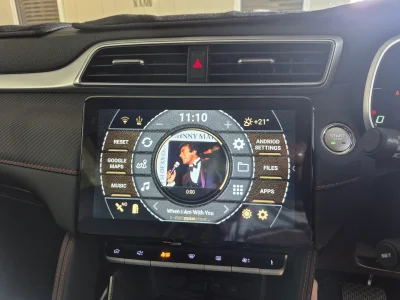
After spending about 12 months posting here on this site and any other forum I could find, I have given up and have now successfully setup a "Android 14 Smart system CarPlay Ai Box 4G 8-Core Wireless CarPlay Android Auto For YouTube TikTok Netflix Car Accessories" using AGAMA Launcher which allows me to run and app I want.

I love the car but it has been let down by people that don't know how it works.


Attachments

  • Agama Home Screen.webp
    Agama Home Screen.webp
    283.8 KB · Views: 19
Thanks in advance for your help!"

Hi doubledroz and welcome to the club where Australian and New Zealand owners of the MG ZS are unable to update their maps and MG Aust don't want to know about it. The are still in the dark ages of the earlier 7" screen and do not understand that the 10.1" that was used in the post 2022 models does not use the Naviextra method where you put a blank USB into the USB A port and expect that the head unit will write information onto the USB stick and you can then use the USB stick to allow you to download the latest maps for your head unit. This method probably worked for the older unit but MG AU/NZ just can't understand that this method does not work on the newer 10.1" screen.

I have tried on 2 occasions to to bring this to their attention and even when I tell MG AU/NZ that MG UK and MG EU are aware of this problem and have gone to the trouble to post the latest maps onto their websites sow that owners can download the maps just by putting in your VIN number.

I know that this method works because I did download the files and managed to install the maps without any problems other than the fact that the map files are for EU, not for AU/NZ and now when I try to fire up the Navigator it has an error telling me that the maps are not for my location SO PLEASE, don't try it.

I have been in contact with an owner in NZ and he has the same problem because, probably because MG AU and MG NZ have a shared head office hence the MG AU/NZ.

The 2 times I have contacted them it was through their Customer Care but on both occasions they have proved to me that they Don't Care.

Maybe if enough MG ZS users complained to them mentioning what happens in UK and EU they might decide to listen.

When I was looking to buy my MG ZS EV, part of the reason for going with it was that I could get 5 years of free map updates but then I found out they can not tell me how to successfully do this.

It has nothing to do with services as it is a user facility but through their complete incompetence the method they tell us to use is for the older head unit.

After spending about 12 months posting here on this site and any other forum I could find, I have given up and have now successfully setup a "Android 14 Smart system CarPlay Ai Box 4G 8-Core Wireless CarPlay Android Auto For YouTube TikTok Netflix Car Accessories" using AGAMA Launcher which allows me to run and app I want.

I love the car but it has been let down by people that don't know how it works.

Hey man, as MG ZS EV 2023 owners in Turkey, we’re having a bit of a rough time. The authorized services claim there are no updates available, so we’re stuck with the factory software version, which is R05.


We’d really appreciate your help so we can at least install something like Agama Launcher and actually enjoy the car’s infotainment system. My specific question is: how can I access the Android Settings menu on this version? Our firmware doesn't have iSMART, and I haven't been able to find a workaround or a gateway to the settings yet.


Thanks in advance for your help!"
 
Last edited:
OK ualevent, I have been thinking about starting a new thread on what I have done so will post something on what I have done, might take a day or so but will get it done for you ASAP.(y)
Thank you very much, my friend. We are eagerly waiting.👍👍
 
No worries, wasn't certain if you were in EU but found you are in Asia so the UK/EU maps won't help and find it interesting that you have the same problem as us in AU/NZ, seems that EU are the only smart ones that recognise the map updates can not be downloaded fron NavieExtra like the older 9" head unit.

Hang in there🥸
 
I actually updated my dad's Ford Mondeo's nav system via the CyanLabs forum - his model wasn't officially supported for the new version with free maps, but you could install the system via a USB drive because the hardware was the same.

I've been looking for a drop-in maps replacement on various forums for the MG, but I can't seem to find any Australian ones that are compatible with the system - MG Australia don't seem to know which system we use for the facelifted MG ZS EV, whether that's Naviextras or TeleNav.

The fact that in Europe they have given you a simple (enough) method of updating them is great.

Maps for Sat Navs in cars were always a bit of a cash-cow for dealers, and Google Maps truly ruined that (and companies like TomTom) which is nice.

It was always extortionate amounts of money for a map update that was already out of date the second you loaded it up, eg a 2024 update could only be maps created in 2023.

I was hoping the OTA capabilities and map upgrade function of the MG ZS EV would work in Australia, but MG here seems to be present only in the way they want to sell you a new car, but not maintain the old ones.


That's awesome Jim, now I know that my infotainment unit and maps can be of a newer version - this is great!

Cheers
Yes i remember 10 years ago, i bought a GM vehicle, i was tempted to buy it with satnav, but as car prices here are insane due to registration tax, i needed a feature packet with the satnav and some other things i did not care for, it would have cost me about $4000 US for that package and then they had the audacity to also want me to pay $150 for a map update, they released yearly.

I opted to not do that as the "cheap" infotainment also had android auto capabilities.

Worst part was...Those who bought the satnav package in the 2019 modelyear REALLY got shafted, for the 2020 refresh the GM brand was bought out by Stellantis and they put a new revised infotainment into those cars, which required another variant of satnav upgrade.

To my knowledge they have never released a map update for the old system after 2019, so they essentially paid a LOT of money for a satnav that they could not even buy an update for, even if they were willing to pay.

Oh and while it is great for europeans that we can get the satnav updated, it is still woefully lacking when it comes to new maps. The newest is soon to be 2 years out of date and even though some might think that roads dont change THAT much in 2 years i can tell you that there are many places where the maps are outdated.

Even my other car (Swasticar) has multiple places where the underlying satellite image is up to date, but the satnav routing still wants to route me to where the old road they erased when making the new one was.

I even for the longest time had the updated image showing a straight road, but the satnavn navigation route still showed me having to go through the deleted roundabout.

And the Swasticar even gets multiple map updates throughout the year, but is still not accurate in multiple places.
 
I live for the day when they just install an Android head unit that allows the owner to load and use whatever apps you desire. These manufactured head unit systems that are so tied to MG etc are a complete PITA for users that want to change things.

The is a user on here who managed to break into the system and was able to install his choice of apps probably by installing an unlocked launcher similar to AMAGA, I wish I new how he did it and I can tell you I have done heaps of searching, but just don't have the knowledge to do it.
 
Hi doubledroz and welcome to the club where Australian and New Zealand owners of the MG ZS are unable to update their maps and MG Aust don't want to know about it. The are still in the dark ages of the earlier 7" screen and do not understand that the 10.1" that was used in the post 2022 models does not use the Naviextra method where you put a blank USB into the USB A port and expect that the head unit will write information onto the USB stick and you can then use the USB stick to allow you to download the latest maps for your head unit. This method probably worked for the older unit but MG AU/NZ just can't understand that this method does not work on the newer 10.1" screen.

I have tried on 2 occasions to to bring this to their attention and even when I tell MG AU/NZ that MG UK and MG EU are aware of this problem and have gone to the trouble to post the latest maps onto their websites sow that owners can download the maps just by putting in your VIN number.

I know that this method works because I did download the files and managed to install the maps without any problems other than the fact that the map files are for EU, not for AU/NZ and now when I try to fire up the Navigator it has an error telling me that the maps are not for my location SO PLEASE, don't try it.

I have been in contact with an owner in NZ and he has the same problem because, probably because MG AU and MG NZ have a shared head office hence the MG AU/NZ.

The 2 times I have contacted them it was through their Customer Care but on both occasions they have proved to me that they Don't Care.

Maybe if enough MG ZS users complained to them mentioning what happens in UK and EU they might decide to listen.

When I was looking to buy my MG ZS EV, part of the reason for going with it was that I could get 5 years of free map updates but then I found out they can not tell me how to successfully do this.

It has nothing to do with services as it is a user facility but through their complete incompetence the method they tell us to use is for the older head unit.

After spending about 12 months posting here on this site and any other forum I could find, I have given up and have now successfully setup a "Android 14 Smart system CarPlay Ai Box 4G 8-Core Wireless CarPlay Android Auto For YouTube TikTok Netflix Car Accessories" using AGAMA Launcher which allows me to run and app I want.

I love the car but it has been let down by people that don't know how it works.
Hi @BOB353

Yes, I've seen your map struggles around the internet - it was what spurred me to ask the question about software and map versions for those in Aus, as I couldn't find a definitive answer, and you're right that MG Customer Service doesn't seem to respond to anything at all.

The Maps issues here and in NZ is puzzling, as there are clearly updated maps somewhere.

The fact that MG Au/Nz seem to be reading off a different play book to UK/EU is super weird, and the general lack of knowledge about all things EV in dealerships is a concern. Like you, I enjoy the car, but I do feel "stranded" by the lack of updates.

I did manage to get the MG iSMART app working, which has been handy... though I have read reports of those in the EU/UK receiving infotainment updates through it, and I definitely have received absolutely nothing.

Regarding the maps, I remember having seen somewhere in some forum a link to a Onedrive account that has Telenav maps - I have searched repeatedly in Google for the original thread, but I've not been able to find it, which is a huge shame.

I did manage to download the zip though, but wished to go through and find the context so I don't screw anything up with my unit.

I guess the worst that happens is that I can't use the built-in Nav.

EDIT: I found the thread - it's from this forum, and it's in the MG4 section. I downloaded the Aus/NZ maps from this post: MG4 Software Update Thread | MG4 EV (2022 to 2025) Forum

I know it's in the MG4 section, but I would assume that the map info is the same?

I'll probably give it a go later tonight, time permitting.

EDIT 2: According to the MG EU page, the ZS and MG4 map file is the same - I'm definitely going to give this a go.
 
Last edited:
Thanks for your reply, just cements my feel that MG AU/ZN just don't give a dam about their users and even after supplying them the evidence, they can't be bothered to follow it up.

Even after proving to my local dealer that the updates don't work, his parting comment was that "this is MG's so i can't do anything else" , what a load of crap.

My original nav does not work so I will try that link on mine and let you know how it goes.
 
Support us by becoming a Premium Member

Latest MG EVs video

MG4 EV Refresh + NEW MG4 EV Urban - UK arrival dates, prices, specs (2026)
Subscribe to our YouTube channel
Back
Top Bottom