Can newer models save the One Pedal Drive setting?

jamakr4

Established Member
Joined
Mar 2, 2025
Messages
330
Reaction score
495
Points
168
Location (town/city + country)
Germany
Driving
MG4 (2022-2025)
I think I I have came across this somewhere a while back and just want to verify if that is actually true? My 09/2023 Lux on R67 does not save it - how about the newer models like 2024/25?
 
I think I I have came across this somewhere a while back and just want to verify if that is actually true? My 09/2023 Lux on R67 does not save it - how about the newer models like 2024/25?
I get why you ask but...

For me, setting the default to level 3 regen ( which definitely does get saved) is completely sufficient for my driving needs.

You get plenty of braking control via the throttle (curvy hill climbs are awesome) and right at the end decelerating you just add an additional "squish" on the brake to come to a "hold".

While being able to "default" to OPD might be nice, I just don't see it as a problem that you can't.
 
I just wonder why they don't bring this to all MG4s featuring OPD. Would be such an easy thing..
Oh I suspect that if you have the latest software installed you will have the functionality.

It's just that MG don't as a rule update your software to the latest version.

It's a shame but there you go.
 
Oh I suspect that if you have the latest software installed you will have the functionality.

It's just that MG don't as a rule update your software to the latest version.

It's a shame but there you go.
In summer I am going to update the car myself (just waiting for better weather as I don't have a garage). But I know someone who's car is almost completely updated and he doesn't have that feature.
 
Recent software does save the setting of the OPD option, but the car will always disable it if snow mode is selected.

This becomes an issue if you set one of the shortcut keys to allow you to select your driving mode. As you cycle through the driving modes, you will end up selecting snow mode, at which point OPD is turned off until you enable it again in the menu.

The problem is that OPD is a single ON/OFF option, rather than being an independent option for each drive mode.
 

There now seems to be a solution for the "older' MG4s (English ReadMe is a bit further down)

To the Moderator reading this: I accidentally posted in the wrong Thread, should be in the MG4 OPD Thread)
Any reports from people that have installed this? The installation instructions on GitHub are a bit vague, is there a more explicit guide?
 
Any reports from people that have installed this? The installation instructions on GitHub are a bit vague, is there a more explicit guide?
It works - I did a video but it's in German


Maybe use Google Translate
 
All installed, at last no disabling three settings every time I get in the car!

The Nova launcher isn't behaving as I'd like, the icon size adjustment range has a smaller maximum it will reach every time I try and adjust them. I'm going to stop now before they disappear into a black hole and swallow up the car! And the icons do not appear on the home screen, I have to scroll up to get the apps screen to appear.
 
All installed, at last no disabling three settings every time I get in the car!

The Nova launcher isn't behaving as I'd like, the icon size adjustment range has a smaller maximum it will reach every time I try and adjust them. I'm going to stop now before they disappear into a black hole and swallow up the car! And the icons do not appear on the home screen, I have to scroll up to get the apps screen to appear.
Maybe consider this: GitHub - Imtiaz-Official/Smart-Edge instead of Nova Launcher

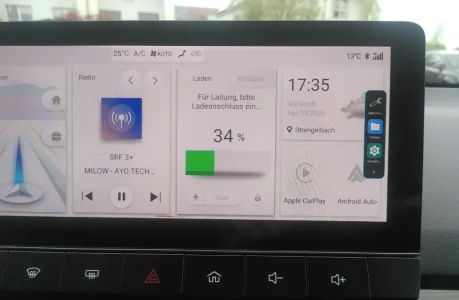
Screenshot 2026-04-27 at 12.52.54.webp
 
I may just drop a launcher altogether, I'm only using the MG4Control, so I have set the swipe up control to launch that, and I have everything I need.
 
The installation instructions are pretty terse and meaningless to someone who isn't familiar with Android development.

How does the installation work, I get you need a USB key presumably to plug in to the car, but the stuff about signing files and permissions means nothing to me. Is this installable without a laptop / Windows setup?

To be clear, I understand how to download a binary version and put it on a USB stick, but not what to do after that to get the car to install it, nor whether I need to sign it in some way before installing it?
 
Last edited:
It's pretty straight forward, but wordy to describe...

First download the .apks you want to your USB drive. Ignore the signing etc, that is only if you customise the app yourself.

1. Enable USB Debugging in Android Settings

You need to get the on-screen keyboard to display, so use something like the Amazon Streaming service on the console. Anywhere you have to use the keyboard will do, Bluetooth settings is an alternative.

Put the cursor in the username field. When the keyboard appears, press and hold the @ key. In the popup tap select language, in the screen to select the language, tap the search magnifying glass top right.

Type in "backup", and tap the backup settings that is found. This launches the Android backup settings screen. Tap the back arrow top left.

You will now be in the full Android settings screen. Select About Phone, scroll to Build number. You need to tap that 7 times to enable developer mode. Once that is done, back again to the main settings screen.

Open System, you should now have a new option for developer settings, open that scroll to USB Debugging and enable it.

Press the Home button on the Infotainment to exit Android and get back to the MG system.

2. Enable ADB in the MG Engineering Menu.

As per the usual instruction (this is for the Trophy model, see elsewhere for SE), go to Settings, keep tapping the Infotainment version until a password dialog appears. Enter 200519.

In the engineering screen that appears, enabled ADB, then select reboot.

3. Load your .apk(s)

Plug your USB drive into the left-hand socket.

Using the steps in 1. above to access Android, but this time instead of typing the initial "backup", enter "files" in the search instead. From the list that appears, select "Files"

The file manager launches, navigate to your USB drive, tap of the .apk. You then get a series of prompts warning you about installing from an unknown source etc. Watch out some of the "buttons" use very small text and appear in the bottom/top corners of the screen.

4. Reboot again (required if you use launchers or swipe to launch) and you should be done with the installation.
 

Are you enjoying your MG4?

  • Yes

    Votes: 1,096 77.7%
  • I'm in the middle

    Votes: 212 15.0%
  • No

    Votes: 103 7.3%
Support us by becoming a Premium Member

Latest MG EVs video

MG4 EV Refresh + NEW MG4 EV Urban - UK arrival dates, prices, specs (2026)
Subscribe to our YouTube channel
Back
Top Bottom