keith1966

Standard Member
Joined
Aug 4, 2025
Messages
23
Reaction score
23
Points
8
Location (town/city + country)
london
Driving
Not an MG
Been having on and off problems with the in car sat nav recently and was wondering if others have had the same problems.
Sometimes when I set a destination the sat nav starts going across green areas or running parallel to roads, the map isn’t the same area that I’m actually driving in. Usually it resets once the car has been turned off and on, or holding down the home button to reset the system.
Is there a software update that can correct this problem? Also speed camera detection is rather hit and miss too.
This is the only problem I have encountered since owning the car from new last September.
 
Last edited:
My HS PHEV has just been into garage for its first annual service. I bought it at the end of February 25. I have been having exactly the same problems that you are describing for most of the year, but not really concerned about it because it would always correct itself when it was restarted. I thought that the problem was happening if I pressed anything on the info screens too early. Ironically the very day that I booked it in for its service it started getting worse and was always waking up at the same location (several miles from where we live), so as we drove, the car’s location on the map was moving, but incorrect, as if it was starting from the location on the screen as the car was started. I mentioned this to the garage, they told me that there was a recall on a firmware update for the Infotainment Screen and they thought that it would fix it. I am delighted to say that it did and fingers crossed, all is working well. The firmware update that was applied was R67.
I am also delighted to report that the update also added 2 extra buttons on the screen when you swipe from right to left, showing ISA (Intelligent Speed Assist) which turns off the warnings if you exceed the speed limit by more than 1MPH, I am happy to leave that on.
The best one is DMS (Drivers Monitoring System) and after pressing that and a confirmation button, it turns off all of the bongs and dings etc when it can’t see your eyes properly. I wear glasses and it very regularly says that I need to pay attention to the road. I don’t object to the concept required for NCAP 6, but it is just far too sensitive and as I said, it can’t see your eyes when wearing glasses and sunglasses.
I hope this helps and a firmware update fixes your car.
 
My HS PHEV has just been into garage for its first annual service. I bought it at the end of February 25. I have been having exactly the same problems that you are describing for most of the year, but not really concerned about it because it would always correct itself when it was restarted. I thought that the problem was happening if I pressed anything on the info screens too early. Ironically the very day that I booked it in for its service it started getting worse and was always waking up at the same location (several miles from where we live), so as we drove, the car’s location on the map was moving, but incorrect, as if it was starting from the location on the screen as the car was started. I mentioned this to the garage, they told me that there was a recall on a firmware update for the Infotainment Screen and they thought that it would fix it. I am delighted to say that it did and fingers crossed, all is working well. The firmware update that was applied was R67.
I am also delighted to report that the update also added 2 extra buttons on the screen when you swipe from right to left, showing ISA (Intelligent Speed Assist) which turns off the warnings if you exceed the speed limit by more than 1MPH, I am happy to leave that on.
The best one is DMS (Drivers Monitoring System) and after pressing that and a confirmation button, it turns off all of the bongs and dings etc when it can’t see your eyes properly. I wear glasses and it very regularly says that I need to pay attention to the road. I don’t object to the concept required for NCAP 6, but it is just far too sensitive and as I said, it can’t see your eyes when wearing glasses and sunglasses.
I hope this helps and a firmware update fixes your car.
Thanks so much for your reply I really appreciate the detailed response and I’m delighted that firstly I am not alone but also it’s fixable with an update. Like yourself I tend to use Waze or Apple Maps, but away for a few days this week and I thought I’d use the car sat nav which worked very well apart from the glitch I described. I will keep the details of the required update and see if I take the car back before its first service. Apart from this small issue I am really delighted with the car.
 
I just use Google maps.
I can understand that. TBH for me, it is not worth the effort of having to plug the phone in via a cable and USB port to access Google Maps. Nothing wrong with it, but for what I do, the inbuilt Sat Nav is absolutely fine, As long as it keeps working 🤞🤞
 
I can understand that. TBH for me, it is not worth the effort of having to plug the phone in via a cable and USB port to access Google Maps. Nothing wrong with it, but for what I do, the inbuilt Sat Nav is absolutely fine, As long as it keeps working 🤞🤞
Did you also have any issues with speed cameras not being recognised and was this corrected after the update? Again it’s a bit hit and miss, coming home down the motorway it spotted every speed camera but if I turn it on nearer home in London, it’s a bit of a lottery and it seems to miss a few cameras .
 
Did you also have any issues with speed cameras not being recognised and was this corrected after the update? Again it’s a bit hit and miss, coming home down the motorway it spotted every speed camera but if I turn it on nearer home in London, it’s a bit of a lottery and it seems to miss a few cameras .
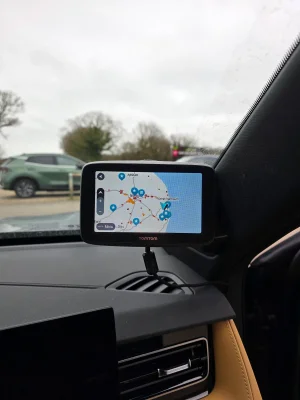
I didn’t have any real problems with speed cameras that I am aware of. The reason I say that is that I also am using a Tom Tom “Tom” device that reports them, so I notice the warnings on that as opposed to the warnings coming from the car infotainment system. I used to have a Road Angel Pure prior to the “Tom” and decided that I didn’t want to keep paying a significant monthly payment so with the “Tom”, it was just one single payment of £69.99 for life, very happy with it.
If I an honest, I think that the car was giving off so many warnings (because I wear glasses) that I tended to listen to them less.
 
I can understand that. TBH for me, it is not worth the effort of having to plug the phone in via a cable and USB port to access Google Maps. Nothing wrong with it, but for what I do, the inbuilt Sat Nav is absolutely fine, As long as it keeps working 🤞🤞
@BoJoUK - Glad that the built-in SatNav is good enough. However, if you want to try Google Maps (and don't want to have a wire) then I can wholeheartedly recommend the USB wireless adapter than I bought. It's currently only £16, so I would say it's worth a punt just to give it a try!

More details here: Apple Car Play using Wireless Dongle
 
Support us by becoming a Premium Member

Latest MG EVs video

MG4 EV Refresh + NEW MG4 EV Urban - UK arrival dates, prices, specs (2026)
Subscribe to our YouTube channel
Back
Top Bottom