Speed Warning Sign

r2uzenblot

Novice Member
Joined
Apr 9, 2026
Messages
17
Reaction score
2
Points
8
Location (town/city + country)
Buckinghamshire UK
Driving
MG4 (2022-2025)
Ive tracked down the various speed warning options but..... how do you stop the speed limit sign flashing if you go over the speed limit? Late at night on the motorway if I go just 1 MPH over it just won't stop flashing.
 
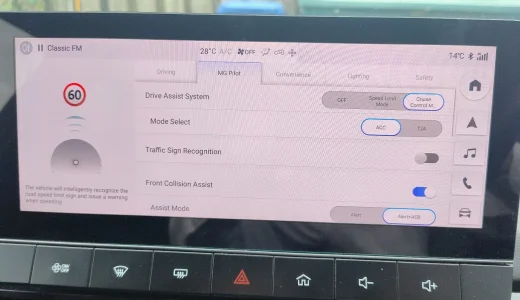
As per my post at #3 you switch off Traffic Sign Recognition as in the image below:

IMG_20260414_154010636_AE.webp

which is accessible via MG Pilot by tapping the car icon on the home page.
 
Yes you can turn off the traffic sign recognition but I find it useful. What I don't want is it flashing all the time when i go over the limit, particularly at night. My Beemer flashes three times and then stops flashing which is perfect.
 
As far as I know there is no way to stop the flashing except by not exceeding whatever speed limit the car thinks it is set. This means it flashes when the car sees 20mph signs on side roads when the speed limit is 30mph as well as when the proper speed limit is exceeded.

The function is either On or Off.
 
I’ve gotten used to the flashing and don’t even notice it anymore. I leave it on because signage is a little poor in most areas here, so sometimes it’s worth checking which speed limit the car thinks it saw last. Thankfully no beeps and bongs.
 

Are you enjoying your MG4?

  • Yes

    Votes: 1,094 77.8%
  • I'm in the middle

    Votes: 210 14.9%
  • No

    Votes: 103 7.3%
Support us by becoming a Premium Member

Latest MG EVs video

MG4 EV Refresh + NEW MG4 EV Urban - UK arrival dates, prices, specs (2026)
Subscribe to our YouTube channel
Back
Top Bottom