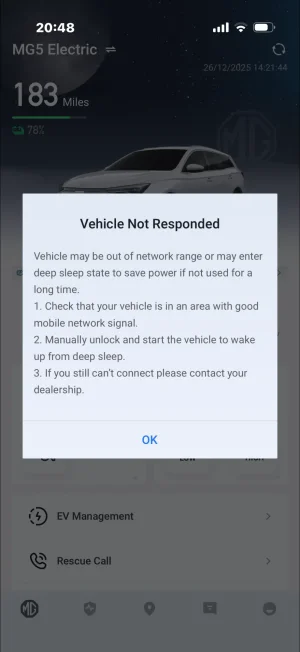
"vehicle not responding" in app

Peterj2019

Standard Member
Joined
Nov 20, 2024
Messages
12
Reaction score
6
Points
5
Location
London
Driving
MG5
Hey everyone,

I’m having a problem with my FL MG5 and hoping someone here might have some advice. The car keeps having trouble connecting to the app, I keep getting a vehicle not responding message whenever I try to use it and only start working again only after I unlock and lock the car. I drive the car every day, so it’s not sitting unused for long periods.
Has anyone else experienced this issue or found a fix for it?

Thanks in advance.

P
 
That happens on my ZS. If the car hasn't been used for a while it goes into deep sleep sometimes even if I've recently used it. Locking and unlocking wakes it up again .
Don't think there's a way around it unless they update IDumb 🤔
 
Has anyone else experienced this issue or found a fix for it?
It should not enter sleep mode when used daily.

Try a HW reset (disconnect 12V battery minus pole for a couple of minutes, then reconnect it) start the car, move steering wheel fully in both directions to clear faults.
 
Whats the cellular reception like where it's parked?

Not sure which network/networks (they may have one of these multi network/roaming sims/esims in them) the MG cars will use for their connectivity features
 
Whats the cellular reception like where it's parked?

Not sure which network/networks (they may have one of these multi network/roaming sims/esims in them) the MG cars will use for their connectivity features
Reception is fine, I'm guessing the car is in deep sleep but it shouldn't go in to deep sleep everyday
 
I have exactly the same issue with my MG5 EV. It hasn’t done it until the last few weeks, but seems to enter deep sleep most nights, even when used that day. It was recently serviced, and that coincided approximately with when I first noticed this, but otherwise I have no ideas.
 
I have exactly the same issue with my MG5 EV. It hasn’t done it until the last few weeks, but seems to enter deep sleep most nights, even when used that day. It was recently serviced, and that coincided approximately with when I first noticed this, but otherwise I have no ideas.
Same issue here. Could it have something to do with cold weather to preserve the 12V battery? A bit annoying when this is also the time I would want it the most to preheat and defrost…
 
Same issue here. Could it have something to do with cold weather to preserve the 12V battery? A bit annoying when this is also the time I would want it the most to preheat and defrost…
It hasn’t ever done it for me until this winter. Could be that the 12V has degraded, or a recent software update? I’ll try to follow up with my local MG garage and see what they say.
 
It hasn’t ever done it for me until this winter. Could be that the 12V has degraded, or a recent software update? I’ll try to follow up with my local MG garage and see what they say.
Do keep us updated. I've not had any issues with it last winter and only started this month. Had mine service back in September but the app was still running fine
 
Same issue here. Could it have something to do with cold weather to preserve the 12V battery? A bit annoying when this is also the time I would want it the most to preheat and defrost…
Weird mine started doing it following a service as well......software update I wonder?
 
Weird mine started doing it following a service as well......software update I wonder?
I think you’re on to something; ours was serviced recently (2nd year) and pre-heat/demist works fine, but I know for certain that they didn’t do any SW updates??
 
Support us by becoming a Premium Member

Latest MG EVs video

MGS6 deep dive + MG2 rumours, MGS9 PHEV preview and Cyber X tease
Subscribe to our YouTube channel
Back
Top Bottom