

jamakr4
Established Member
- Joined
- Mar 2, 2025
- Messages
- 295
- Reaction score
- 457
- Points
- 155
- Location (town/city + country)
- Germany
- Driving
- MG4 (2022-2025)
Since my MG4 was updated to R67, accessing the AC settings has become annoying. You now have to exit CarPlay (CP) or Android Auto (AA) completely before you can pull down the dropdown menu.
I found a solution that fixes this and makes access quick again!
 Important Tip if you don't have a 3rd Party Launcher:If you don't have a custom launcher installed, you might get stuck after granting a permission because there is no way to navigate back to the app.
The Fix: Simply go back to your USB drive and "install" the app again. It won't actually reinstall it, but it will take you back to the completion screen where you can click "Open" again. Repeat this process until all settings/permissions are configured.
Demo:
And yes, it works in Android Auto!
I found a solution that fixes this and makes access quick again!
The Solution
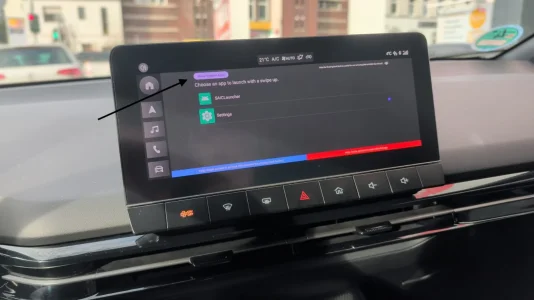
I used the MG4 Swipe NovaLauncher tool. Originally, this was designed to give quick access to personal launchers (like Nova), but you can reconfigure it to launch the HVAC (AC) app directly.- How it works: Swipe up from the bottom right of the screen to instantly open the AC menu.
- To close it: Swipe up from the bottom left (this acts as a "Back" button).
Installation Guide
The installation is very simple:- Prepare: Put the downloaded .apk file onto a USB stick.
- Install: Plug the stick into your car. Go to Android Settings -> Storage -> USB Drive. Select the apk and install it.
- Open: Once installed, you will get an option to Open the app immediately. Do this.
- Permissions: Grant the app the necessary permissions it asks for.
Important Tip if you don't have a 3rd Party Launcher:If you don't have a custom launcher installed, you might get stuck after granting a permission because there is no way to navigate back to the app.The Fix: Simply go back to your USB drive and "install" the app again. It won't actually reinstall it, but it will take you back to the completion screen where you can click "Open" again. Repeat this process until all settings/permissions are configured.
- Configure: Inside the app, look at the top left and select "Show System Apps".
- Select App: Find the HVAC app in the list and select it.
- Home Button Setup: When you press the physical Home button on the dash, the car might ask you which app to use (SAIC Launcher or the Swipe app):
- Select SAIC Launcher and choose "Always". This ensures your home button keeps its original functionality.
Demo:
And yes, it works in Android Auto!


 .
.



