Hidden keys

What is the hidden key? we have a trophy with two fobs, we use the buttons on the fob to lock an unlock the car. Is there some secret aspect to the fobs i'm not aware of?
 
Slight OT, but has anyone managed to get the digital key (the one to drive the car) working on the app?
Yes, set it up and used it to start the car a few times, just as a novelty. Hoping I never need to use it i.e. lost my proper key :LOL: but it a good back up so I'm not stuck
 
What is the hidden key? we have a trophy with two fobs, we use the buttons on the fob to lock an unlock the car. Is there some secret aspect to the fobs i'm not aware of?
This video shows you the emergency key and how to replace the battery.
 
I have just tried the Digital Key in my Trophy and it works (tried twice). I put my keys into their Faraday pouches. Full control was available but I only moved the car a few feet.
I did try my digital key : but couldnt get it to work - but is no major issue
 
Same here, quite a few people have this issue.
Really? You should get the "system ready" message on the driver display. Then you can put it in drive/reverse and move off.
 
Nope just a key not detected message - or that's the gist of it anyway.
Unlocking and locking with the digital key works fine.
 
I’ve a feeling you need to press the brake pedal maybe. Can’t recall as I haven’t tried it for a while, but there was something to be done before it got itself ready to drive using the digital key
 
I get the error message when I press the brake pedal to put it into ready mode.
 
Last edited:
I get the error message when I press the brake pedal to put it into test mode.
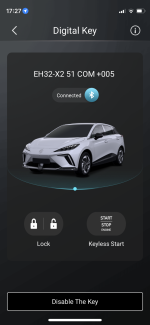
Same here (using the attached part of the app : under my profile, digital key): its connected to the car via bluetooth, and can lock unlock just like the key (no delay), but as soon as i hit the brake peddle is says smart key not detected, and some times another msg about the manual key?
 

Attachments

  • IMG_4975.PNG
    IMG_4975.PNG
    482.3 KB · Views: 87
After unlocking, use the button to the right to start the car. THEN press the brake pedal. (If you don't use the Start button then the car doesn't know the digital key is there).
"the button to the right to start the car" : which button?
 
Oh that one - It didn't work in my case (from recolection it worked in the 1st month - but then was disabled by MG? - due to a security issue?)
Only the key sharing was disabled
 
Only the key sharing was disabled
Ok : I'll delve a litttle further, whilst its not a major challenge, nevertherless would be very useful incase I left me keys at home (as my car is quite near the keys in the house - yes this is a security issue, but what can i do? (+ live in the middle of nowhere!)), but had my phone with me (y)
 

Are you enjoying your MG4?

  • Yes

    Votes: 1,065 77.7%
  • I'm in the middle

    Votes: 208 15.2%
  • No

    Votes: 99 7.2%
Support us by becoming a Premium Member

Latest MG EVs video

MG4 EV Refresh + NEW MG4 EV Urban - UK arrival dates, prices, specs (2026)
Subscribe to our YouTube channel
Back
Top Bottom