MG4 Software Update Thread

Another alternative that AI has given me, I've passed it on to my colleague and am waiting for his response, in case you want to try it.

-ERROR MESSAGE-
The package in the root directory of the USB flash drive is not recognized correctly. Please check if the storage address of the package is correct.

This error is very specific: the system is looking for the control file in the wrong place or in a format it doesn't like. On the MG4, when this exact message appears, it's usually for one of these three reasons:

-1. The "double" installer.json (Master Trick)
The R30 system sometimes has a routing bug. To fix it, do this on your USB drive:
Copy the installer.json file to the root directory.
Copy the same installer.json file AGAIN into the AVN_MPU folder (next to update.zip).
This way, the car will find it no matter what, regardless of the route it's mapping internally.

-2. The USB "GPT" vs. "MBR" Problem
This is the most common technical error in 2024 models. If your USB drive was prepared on a modern computer, it likely uses a GPT partition table, but the car only understands MBR.

How to fix it: You need to format the USB drive using a free tool like Rufus.

In Rufus, select: Partition scheme: MBR and Target system: BIOS or UEFI.
Format: FAT32.

If the USB drive is GPT, the car will see the folders, but the low-level installer (the one that throws the error) won't be able to read the file.

-3. File Name Cleanup (Hidden Extensions)
Make sure Windows isn't misleading you with file extensions:
If you see the file as update.zip.zip or installer.json.txt (because Windows hides known extensions), the car will throw an error.

Verification: Right-click on the file -> Properties. Make sure the "File type" is exactly .json and .zip.

Your final structure should look like this: "Duplicate the .json file in both locations"
USB:\installer.json
USB:\AVN_MPU\installer.json (Extra copy)
USB:\AVN_MPU\update.zip

AI is sometimes fun and sometimes it gives good hints.
But in case of MG's FICM updates it fails completely.

It seems that there is no hint at all in all of the free sources AI can search online.

The best way would be the one DonBattino suggested.
 
AI is sometimes fun and sometimes it gives good hints.
But in case of MG's FICM updates it fails completely.

It seems that there is no hint at all in all of the free sources AI can search online.

The best way would be the one DonBattino suggested.
You're right, I was just trying to throw out some ideas since I can't test it. Time will tell.
 
Hi everyone,

I apologize for posting this, but I want to ensure I’m taking the correct steps.

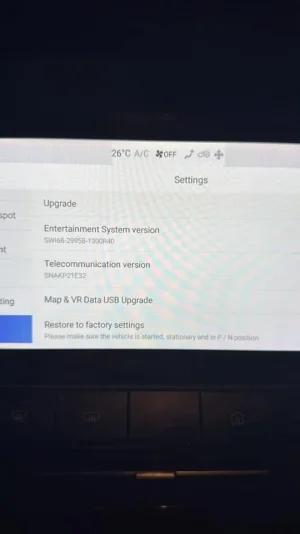
My current MG4 Luxury (LHD, with a rear wiper) is in this version:

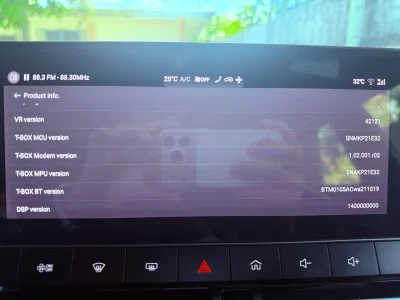
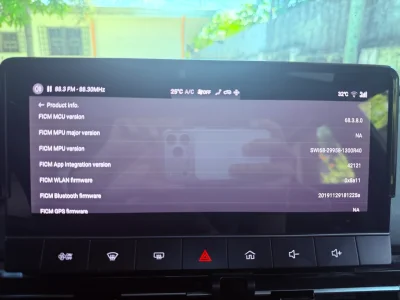
SWI68-29958-1300R40. The screenshots include all the relevant versions of the essential components. Please let me know if you need any additional information.

I’m upgrading my infotainment system because I’m experiencing a strange issue with the screen. It goes black after the CarPlay screen transitions to the 360-degree camera view when I turn the steering wheel and accelerate due to the camera overlay. I’ve attached a video here demonstrating the issue.

Ideally, I’d like to update to the latest possible version.

What versions should I use to upgrade from R40? I see the need for SIPS but in my case, is it possible to do it only in USB?

IMG_1571.webpIMG_1572.webpIMG_1573.webp
 
Last edited:
AI is sometimes fun and sometimes it gives good hints.
But in case of MG's FICM updates it fails completely.

It seems that there is no hint at all in all of the free sources AI can search online.

The best way would be the one DonBattino suggested.
Large language models look for patterns in text across large datasets on the web. Those datasets can (and do much of the time) contain inaccurate data. Much of what ends up delivered as impressively formatted 'textual answers' is rubbish as anyone can put rubbish on the web and as we know, it's filled with rubbish more every year. Not really 'AI' at all just a term attached so it sells to the masses who inevtiably jump on anything 'new'. A little like the queues that used to be seen at Apple stores when new iphone models became available.
 
Last edited:
Okay, I finally updated my unit from R40 to R59. I am happy with it but how do I downgrade to SWI68-29958-1300R40 if PMS is near? Do we have a file? I only see SWI69-29958-1100R40.zip, not SWI68-29958-1100R40.zip in happy bunny's OneDrive...
 

Are you enjoying your MG4?

  • Yes

    Votes: 1,085 77.8%
  • I'm in the middle

    Votes: 208 14.9%
  • No

    Votes: 103 7.4%
Support us by becoming a Premium Member

Latest MG EVs video

MG4 EV Refresh + NEW MG4 EV Urban - UK arrival dates, prices, specs (2026)
Subscribe to our YouTube channel
Back
Top Bottom