MG4 Software Update Thread

Maybe try this : MG4 Software Update Thread | MG4 EV (2022 to 2025) Forum

Take the R41 file named "update."something" and compress with 7zip to a zip file and name it "ficm_soc.zip"

After that try a USB update from engineering menu.

And maybe there's a process we don't know yet or not available with VNCI (require a VCI II)?
Only to be sure I unterstand you correctly:

I should try to take the xxxxxx.51 file which contains the installer.json and the usb_ota_update.zip and rename/rezip it as „ficm_soc.zip“?
Or should I only rename the „usb_ota_update.zip“ to „ficm_soc.zip“?
 
Didn't work... unfortunately...

Still getting the error:

The package in the root directory of the USB flash disk drive is not detected / recognized correctly. Please check if the package's storage address is correct.
 
There's the problem, the folder structure seems not to follow the previous SWI-branches.

Using the folder AVN_MPU wasn't successful, using the root folder wasn't either.
I also tried a bunch of other folder names...
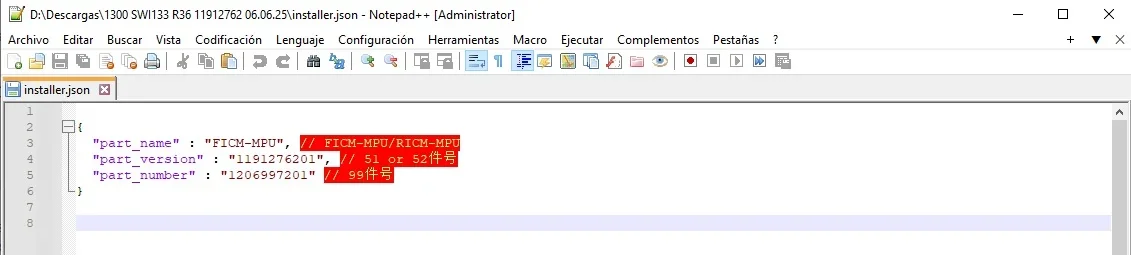
The installer.json file names the FCIM-MPU folder but doesn't mention AVN, in case that helps.
I'm not familiar with the engineering mode structure of your vehicle, so there might be a new section.
 

Attachments

  • FICM-MPU.webp
    FICM-MPU.webp
    24.4 KB · Views: 41
Hello, I have an issue with update : more precisely SIPS server shows I have lastest version - on all modules which is definetly not true.

MG4 77kWh trophy aka exclusive. car is in EU
FCIM: mpu SWI68-...-1300R40, mcu: 68.3.8.0 latest is R71
TBOX: mpu SNAKP21E32, mcu SNMKP21E32 latest is SN*KP23E32

I have received the vnci tool (soft 1.9 firmware1.0.0.9) today and I proceeded to read what I have in car , surprise is that all modules look green, as they match server, I wonder how is this possible ? car was MY2023, in service in octomber 2025.

I can see differences on the screen with other updated cars on youtube (no ev route app for example)
but SIPS shows "all up to date".

I'm thinking maybe i should try r40>r59 (via stick both mpu, mcu) and try SIPS again and shows reality, if is ok will do r59>r71.

You guys have more experience:
is this correct path ?
OR i lost something on the way, missunderstood something, maybe SIPS is just for core modules?
why sips is lying ?
if it fakes modules I'm sure of fcim, tbox, does it fake the important one BCM, radar, evcc ?


PS: while driving did not had issues with LKA, but I also stayed in lane, so SCO77 I think is applied, second user, cannot be sure
 
The installer.json file names the FCIM-MPU folder but doesn't mention AVN, in case that helps.
I'm not familiar with the engineering mode structure of your vehicle, so there might be a new section.

I tried some folder structures with "FICM-MPU" and "RICM-MPU".
Unfortunately without success.

AVN has been updated via SIPS to the most recent version as far I can tell.
The version ist higher now than before the SIPS update.

Thanks anyway.
 
Hi there,

I'm tring to update from SWI68-29958-1300R30 to later versions. I need to install SWI68-29958-1300R33 first as I'm having hassle. Does anyone have a link to it?

It's so old it's been deleted from everywhere. 😠
 
Hello, I have an issue with update : more precisely SIPS server shows I have lastest version - on all modules which is definetly not true.

MG4 77Kw trophy aka exclusive. car is in EU
FCIM: mpu SWI68-...-1300R40, mcu: 68.3.8.0 latest is R71
TBOX: mpu SNAKP21E32, mcu SNMKP21E32 latest is SN*KP23E32

I have received the vnci tool (soft 1.9 firmware1.0.0.9) today and I proceeded to read what I have in car , surprise is that all modules look green, as they match server, I wonder how is this possible ? car was MY2023, in service in octomber 2025.

I can see differences on the screen with other updated cars on youtube (no ev route app for example)
but SIPS shows "all up to date".

I'm thinking maybe i should try r40>r59 (via stick both mpu, mcu) and try SIPS again and shows reality, if is ok will do r59>r71.

You guys have more experience:
is this correct path ?
OR i lost something on the way, missunderstood something, maybe SIPS is just for core modules?
why sips is lying ?
if it fakes modules I'm sure of fcim, tbox, does it fake the important one BCM, radar, evcc ?


PS: while driving did not had issues with LKA, but I also stayed in lane, so SCO77 I think is applied, second user, cannot be sure
You just need R63 or above, R67 for BT stability, or R71 fopr lastest version.
After that, you have to update FICM MCU to 68.4.9.0 or above with SIPS.
 
You just need R63 or above, R67 for BT stability, or R71 fopr lastest version.
After that, you have to update FICM MCU to 68.4.9.0 or above with SIPS.

so currently comparing modules from to server I have 100% match and if I apply a elevated FCIM SIPS will no longer show match ?
 
FICM and ECU's aren't related.
If you update FICM, you just need to update FICM MCU which is related to FICM (USB update FICM MPU only for SWI68 build since R59)
Don't worry, download files for R67 or R71 and update your car
 
I tried some folder structures with "FICM-MPU" and "RICM-MPU".
Unfortunately without success.

AVN has been updated via SIPS to the most recent version as far I can tell.
The version ist higher now than before the SIPS update.

Thanks anyway.
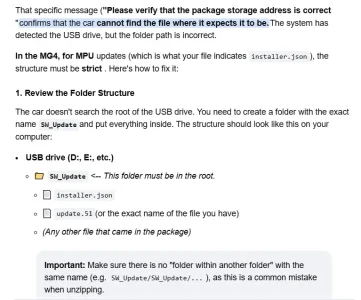
Investigating with AI, it says this:
What the AI says is that it makes a call to the .51 file, but the file is usb_ota_update.zip.
Solution summary:
  1. Format the USB drive in FAT32 (MBR) .
  2. Create the folder SW_Update.
  3. Copy the installer.json file.51 into that folder.
 

Attachments

  • Sin título2.webp
    Sin título2.webp
    50.5 KB · Views: 18
Last edited:
Well, the AI feature isn't working with the SW_Update folder.
I have a colleague here in Spain with the same problem; he's tried renaming it, leaving the .zip file, and a long list of other things, without success.
I'm wondering, seeing as other updates mention a factory reset before updating...
 
A factory reset doesn't change the situation.

I already tried it, just in case it kicks off an incremental update routine (with files that were transferred via SIPS before).
Without success...
 

Are you enjoying your MG4?

  • Yes

    Votes: 1,082 77.7%
  • I'm in the middle

    Votes: 208 14.9%
  • No

    Votes: 103 7.4%
Support us by becoming a Premium Member

Latest MG EVs video

MG4 EV Refresh + NEW MG4 EV Urban - UK arrival dates, prices, specs (2026)
Subscribe to our YouTube channel
Back
Top Bottom