The A button next to the handbrake

foksie88

Novice Member
Joined
Nov 8, 2025
Messages
6
Reaction score
1
Points
1
Location (town/city + country)
Kasterlee Belgium
Driving
ZS EV
Hello folks, does anyone knows what the A, looks like (A), button (knob) next to the handbreake button is? and where in the navigation unit are the road maps? are they accesseable via laptop ? thanks!
 
The A button when pressed in will put the handbrake on automatically as you come to a stop
 
Hello folks, does anyone knows what the A, looks like (A), button (knob) next to the handbreake button is? and where in the navigation unit are the road maps? are they accesseable via laptop ? thanks!
The maps are only viewable on your Navigation Unit. In theory they are updatable by the owner (see other posts) but my dealership say that MG Customer Support 😂 have advised them that Dealership's cannot carry out this work. So my 25 plate ZS EV LR has 2022 maps. Use Waze or Google Maps instead.
 
Hello folks, does anyone knows what the A, looks like (A), button (knob) next to the handbreake button is? and where in the navigation unit are the road maps? are they accesseable via laptop ? thanks!
Auto brake. Intended to prevent you rolling back when bumping along in traffic on an incline.
At least, that was what the dealer told me on a test drive. Never pressed it myself.
 
Thx for the reply, is there any sign on the dashboard to see that?
On my HS PHEV apart from the green P sign showing when it’s actually applied, the button has an orange LED on it to indicate it’s activated. I usually have it on unless I am manoeuvring. Although the release only requires very slight touch on the accelerator, it’s smoother for manoeuvring.
 
Any car I’ve had (auto) when activated when the car comes to a stand the brakes are applied and it allows you to take your foot of the brake pedal with the car still in drive and when you press the accelerator again it will release . I’ve not tried it on my HS yet .
 
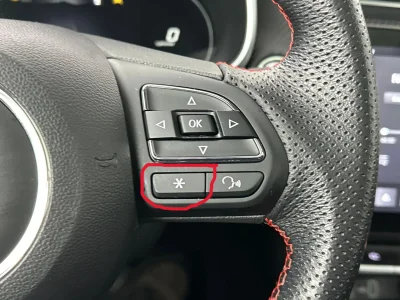
Thanks for the reply guy's and I just wonder what's the asterix or icesign on the steering wheel is, see pic, thx
 

Attachments

  • stuurwiel.webp
    stuurwiel.webp
    304.2 KB · Views: 6
Thanks for the replay but I haven't found that in the manual, nothing about this button was mentioned in my manual, is it because it's a 2020 model and not a Facelift
Says on page 85 here, that it is a shortcut button, but i did not find any mention of how to set it.


On the 2.gen it is in the menu on the infotainment somewhere, i guess it must be the same on the 1.gen

I think on the 2.gen, if it is not set and you press it, it will actually pop up the corresponding menu to enable you to set it.

But i might be wrong.
 
Support us by becoming a Premium Member

Latest MG EVs video

MGS6 deep dive + MG2 rumours, MGS9 PHEV preview and Cyber X tease
Subscribe to our YouTube channel
Back
Top Bottom

