MG4 Software Update Thread

@siteguru
I see you’re also driving a Standard MY22, right? Did you happen to install R42 and then run a SIPS update afterwards?
@all
Is anyone here who has installed the R69 update on a Luxury/XPower/Trophy model and then also checked for updates via SIPS afterwards?
I don’t really understand the logic behind SIPS – or rather, I’m trying to understand it:
With R40, SIPS shows that there is no newer entry for the “Operating System” in the “Manufacture Data Base”.
With R42, SIPS tells me that the “Operating System” version installed by R42 is not the latest one and that there is an even newer entry in the “Manufacture Data Base”.
Huh? 😂 WTF?
 
My Xpower is running SWI133 & R32 on a 2025 build date.
My 2024 Trophy is running software version SWI133-29176-1300R36. When I picked it up from the dealer in Poland (~800 km from my home), they told me it was the newest software for that model. I contacted a local dealer about an update, and their answer was that they won't know if it can be upgraded until they connect the car to a computer.
"Does anyone know if there is a newer software version for my MG4?
 
Last edited by a moderator:
I think this is the most up-to-date version! My Luxury my24 is equipped with SWI133-29176-1300R30 and I don't know if anything changes with the R36 or if it should be updated?
 
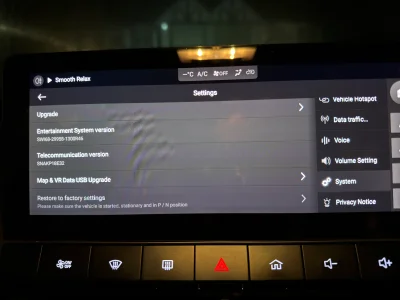
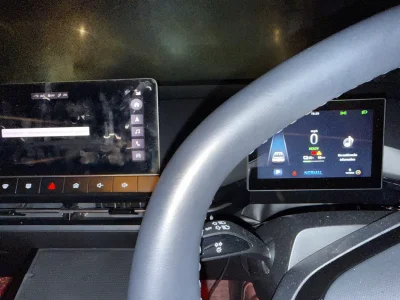
Hey, so I tried to update the MCU version via the menu, it first looked like it was all going ok, detected vehicle state all fine and said it would restart and apply the update..

When it restarted it said update failed. When it went back into the engineering menu it showed no version against the MCU. And as expected it can no longer communicate with any of the car modules... volume buttons do nothing, aircon controls don't work :(

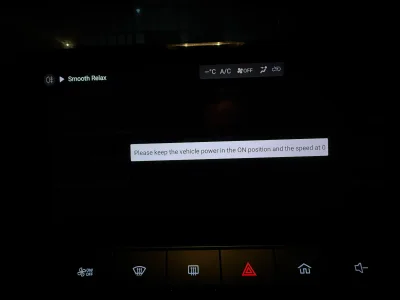
I assume the only way to recover (short of taking it to MG) is to update via SIPS? I don't have the cables yet, but if I need to, then I'll have to get them...I can't even get into the engineering menu at this point, as it comes up with the message saying to keep the power on and speed at 0 (which is most likely because it cannot see the status of the car anymore!)

Thanks!
 
@AdamskiEM I’ll try to help you. But for that, I need to know all the details of what you did and what you didn’t do. Starting with which R version you used, what kind of USB stick you used, and how you formatted it. Also, of course, the info about the model year and trim level.
 
@DonBattino452 Hey, thank you. I used "1300 SWI68 R67" from Google Drive. Formatted the USB as FAT32 (formatted from Windows) and dropped in the files as they appear in the ZIP folder. So the vipimage.bin and md5_check.txt in the top level and a AVN_MPU folder with the ota update zip in it.
I followed the steps from this top post Trophy/Luxury 22/23 FICM loading guide but did just the AVN MCU step.

Is a UK Trophy, 2023 model (without the wiper).

It was showing the following (when I could get into it)
MCU: 68.4.3.0
SWI68-29958-1300R46

I was considering disconnecting the 12V battery to force the screen to reboot, but then I'm worried it won't detect anything and stay turned off..
When I lock the car the screen is basically on forever now :(
 
Last edited:
Just for remember: for SE/SE ER/Standard/Comfort with build SWI69, FICM MPU and MCU updates could be perform by USB.

For Trophy/Luxury with build SWI68, FICM MCU can be only updated with SIPS since R59 update. So for R63, R67, R69, SIPS is mandatory.

What you can do : revert to R46 for MPU and MCU or R59.
 
Just for remember: for SE/SE ER/Standard/Comfort with build SWI69, FICM MPU and MCU updates could be perform by USB.

For Trophy/Luxury with build SWI68, FICM MCU can be only updated with SIPS since R59 update. So for R63, R67, R69, SIPS is mandatory.

What you can do : revert to R46 for MPU and MCU or R59.
Thanks, so essentially I can only do this via SIPS now because the FICM doesn't recognise anything the car is doing so won't let me into the engineering menu?
 
Thanks, so essentially I can only do this via SIPS now because the FICM doesn't recognise anything the car is doing so won't let me into the engineering menu?
As I said, you can roll back to R46 or R59 because MCU is still in USB files for those updates
 
As I said, you can roll back to R46 or R59 because MCU is still in USB files for those updates
OK let me just get this clear before I make things worse.

If I put the R46 files on a USB, will it just recognise it and update automatically? Because as I say, I can no longer get into the engineering menu to ask it to perform the upgrade
 

Are you enjoying your MG4?

  • Yes

    Votes: 1,059 77.6%
  • I'm in the middle

    Votes: 207 15.2%
  • No

    Votes: 99 7.3%
Support us by becoming a Premium Member

Latest MG EVs video

MGS6 deep dive + MG2 rumours, MGS9 PHEV preview and Cyber X tease
Subscribe to our YouTube channel
Back
Top Bottom