MG4 Software Update Thread

Just be aware that any update that affects TJA will be one that is applied via SIPS (the software used to update car module firmware via the OBD port) - the Infotainment software has no impact on this, as I the very latest available for the SE SR (on the SWI69-29958-1100Rxx branch).
 

Attachments

  • Screenshot_20260215-151607~2.webp
    Screenshot_20260215-151607~2.webp
    159 KB · Views: 126
I'll just leave this here... It's a post from me:


First sentence for anyone that doesn't want to click a random link: "I've only gone and got ADB working!"
 
I had a really strange occurrence where my phone briefly showed up SAIC 1.0 under wireless CarPlay but hasn’t since.

Now bearing in mind I’ve never connected my iPhone 17 to my car via USB cable and have only ever used a wireless dongle which shows up as ‘SmartBox_8387’ so I don’t know what was going on.
 
Yes, or at least there are instructions to install it.

But unfortunately I haven’t grabbed it so far…
Hi everyone,

In our vehicles, do we see/check the FICM and MCU updates in SIPS, or is it done through VDS?

Does anyone have screenshots of these methods or know exactly how it’s done?

Sometimes people share new version numbers in the forums — where do we find out about them and how do we download them?

Thanks in advance for your answers!”
 
Hi everyone,

In our vehicles, do we see/check the FICM and MCU updates in SIPS, or is it done through VDS?

Does anyone have screenshots of these methods or know exactly how it’s done?

Sometimes people share new version numbers in the forums — where do we find out about them and how do we download them?

Thanks in advance for your answers!”
FICM MCU update is seen and updated in SIPS.

VDS on the MG4 is for diagnostic & testing ONLY, programming, calibration and configuration isn't possible and is greyed out as its not supported.

New MCU version numbers are shared after they're updated via SIPS, as MG update numbering is different to how it's displayed on the FICM eg 11852837.

MPU updates are via USB on older models, SIPS on current models.
Older models the update is found and downloaded from MG care by dealers which then share to a couple of members.
 
Last edited:
Hi.
Well, today was the day! I paid for an hour and in 5 minutes it was already working with the updates without any problems. The credentials process was very quick "rookie luck."
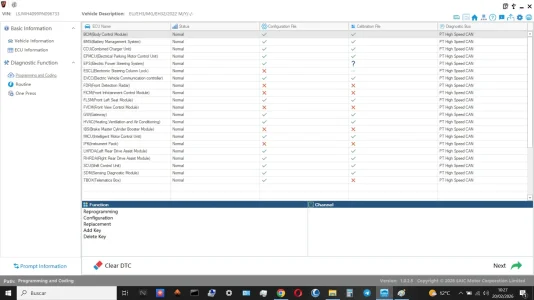
I updated the IPK, FICM, and BMS step by step, but my goal was the Tbox, which I don't see how to do in the same way as the others.
So far, each step seems to be going well. I don't understand the issue with updating large files.
Any help would be appreciated...we'll see how it goes; I'm working on it.
Once the process is complete and I've absorbed all the information, I'll attach images.
As @haloweenhamster mentioned, I'll try it via USB once I'm finished with SIPS.

Thank you.
 
Last edited:
I tried the USB method for the T-Box and it gave me an error. All the modules updated correctly except for the T-Box via SIPS.
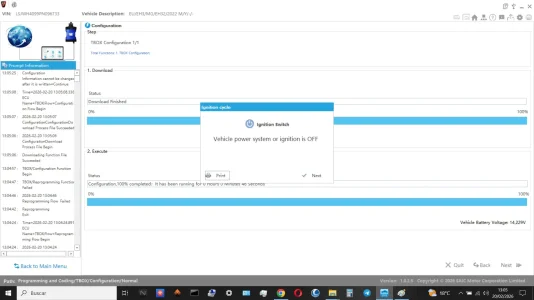
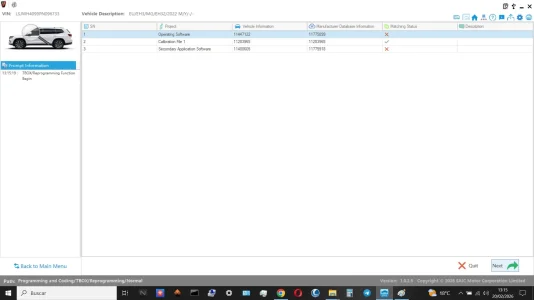
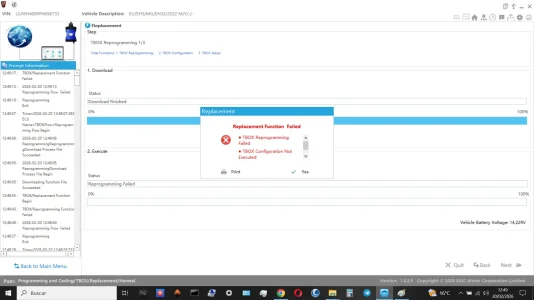
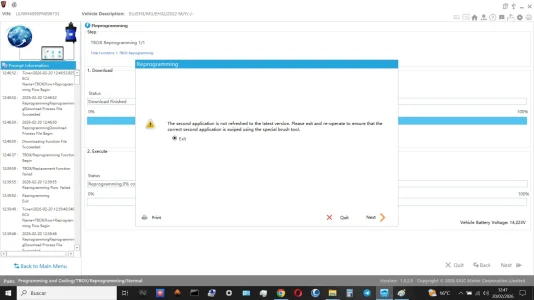
These errors appear in SIPS and I don't know where to go from here. I've attached screenshots so you can help me figure out the cause. The vehicle is a Lux/Trophy 22.
I've tried several methods to reprogram the T-Box, and they've all given me an error, even the step that instructed me to turn the vehicle off and back on.
Everything's fine except the T-Box, which I'm completely stumped about. Could it be because I suddenly switched from my current 18E32 to a 23E32?

I should mention that I bought an hour to test if the connection was working correctly, without much hope.
The thing is, I've spent over 3 hours updating all the modules, and it's been fantastic in terms of performance and connection.
My first experience has been wonderful...
 

Attachments

  • Start.webp
    Start.webp
    97.7 KB · Views: 47
  • TBox_Off.webp
    TBox_Off.webp
    77 KB · Views: 35
  • programing TBox.webp
    programing TBox.webp
    46 KB · Views: 27
  • TBox_Falied.webp
    TBox_Falied.webp
    77.9 KB · Views: 39
Please show screenshot from engineering menu that you're able to enter with 5x tapping and 200519. I want to see if menu shows correct TBox version.

And there are a lot of updates to do 🤓. I see a lot of ❌.

Why do you use replacement function? By accident?
 
Please show screenshot from engineering menu that you're able to enter with 5x tapping and 200519. I want to see if menu shows correct TBox version.
The ❌ are the image before the update, afterward, everything seems correct except for the T-Box.
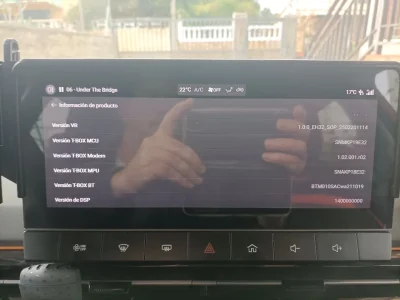
The engineering menu displays the attached image. My goal is to upgrade to SNAKP23E32.
I have tried Reprogramming, Configuration and Replacing, and I get the same error in all of them.
I drove around for a while this afternoon to see if I noticed anything unusual, and the vehicle works perfectly. My only complaint, or perhaps it's just a minor issue, is with the T-Box and its connection to the iSmart app, 4G signal, and SOS function; they tend to malfunction frequently.
 

Attachments

  • 4.webp
    4.webp
    60.5 KB · Views: 33
  • error TBox.webp
    error TBox.webp
    80.7 KB · Views: 31
Last edited:
@Pisuke Your first picture is the proof that your try flashing TBox via USB was unsuccessful. Please try again, first USB flash and then SIPS afterwards. Your info screen must show ...P23E32. You have ...P18E32 and ... P19E32 at the moment.

This is the guide you have to follow exactly.
 

Attachments

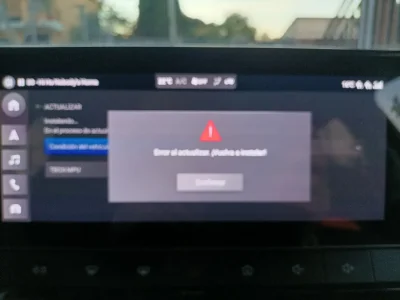
This image, although blurry, "sorry," is a USB update, which says "error installing, please reinstall."
 

Attachments

  • photo_2026-02-20_18-45-46.webp
    photo_2026-02-20_18-45-46.webp
    91.8 KB · Views: 35
Then: Please show me your USB stick, the format (fat32/exfat/NTFS) and the file structure on the USB stick.
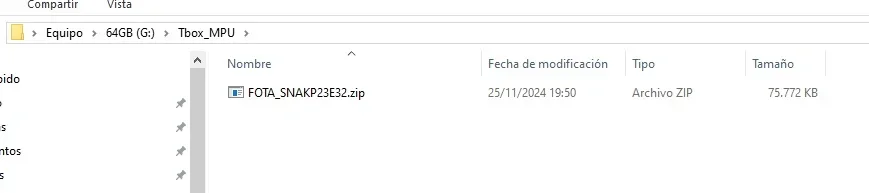
I followed those steps and it's not working, it keeps giving me an error.
There's something I'm missing...
 

Attachments

  • Sin título.webp
    Sin título.webp
    7.1 KB · Views: 29
@Pisuke I'll help you 😉.

#1: Choose an USB stick up to 32 GBs so you can format it easily with fat32. If your USB stick is larger, use Rufus to format it with fat32 extended.

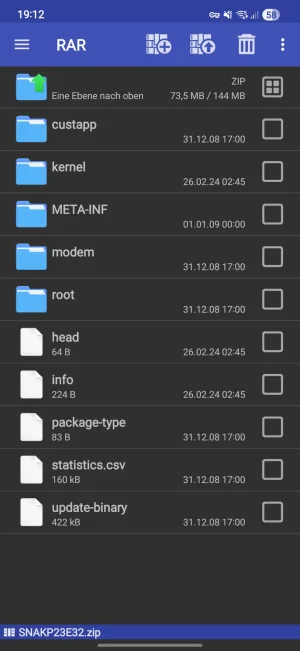
#2: Go to root directory. It must be blank. Then, please create a folder 📁 called Tbox_MPU.

#3: Download correct ...P23EH32 zip-file, extract it and put every file in folder Tbox_MPU.

The structure looks like this:

Screenshot_20260220_191228_RAR.webp

#4: Follow pdf guide and update again.

Your file structure is wrong. You haven't followed the guide correctly 😉.
 

Are you enjoying your MG4?

  • Yes

    Votes: 1,074 77.8%
  • I'm in the middle

    Votes: 207 15.0%
  • No

    Votes: 100 7.2%
Support us by becoming a Premium Member

Latest MG EVs video

MG4 EV Refresh + NEW MG4 EV Urban - UK arrival dates, prices, specs (2026)
Subscribe to our YouTube channel
Back
Top Bottom