MG4 Software Update Thread

@BingBong You could solve your WiFi problem either with a long ethernet cable (cheap, CAT5 is enough for around 100 Mbit/s) or you can use your phone's hotspot function šŸ˜‰. USB Tethering is an option, too --> you use your phone like a wired modem.

For the missing message: Maybe a soft reboot is needed? Long press on home šŸ  button.
The problem is that there is even not 4g/5g signal there.

About the message. I tried. Also tried factory reset.

When i connect to the charger there is the estimate time message there
 
I am from Israel. Also Romanian citizen...
My problem is that i don't have WIFI at my garage. If i had i would order vnci.

Btw, anyone noticed that R67 doesn't have "please plug to charger" message?View attachment 43191
It's the normal screen since R67 for SWI68.
Same with R40 for SWI69.
The message was disturbing: when you drive, it say "please plug to charge..."
Fun fact: it came back with R45 for SWI69
 
It's the normal screen since R67 for SWI68.
Same with R40 for SWI69.
The message was disturbing: when you drive, it say "please plug to charge..."
Fun fact: it came back with R45 for SWI69
Good to know.
And yes i agree that this message is pointless. "Please plug to charge" even on 100% SOC
 
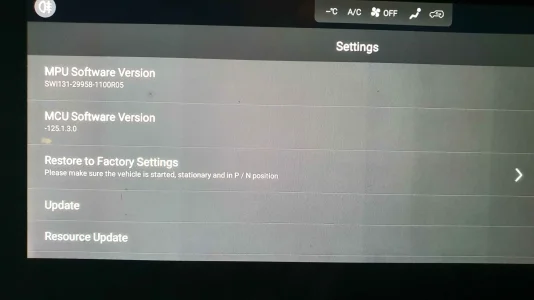
So i know from a lot of reading around these forms that the software in Australia is a little bit different then the rest of the world, but I have no idea what my
SWI131-29958-1100R05 compares to when comparing to the R27-67-71 ETC as the Australia version has the SWI131 code.

Also my MCU version is -125.1.3.0 which i believe is a real impossibility as ive never seen a negative version number!

Attached is the software page from the car
 

Attachments

  • 20251231_211418.webp
    20251231_211418.webp
    164.9 KB · Views: 17
Hello,

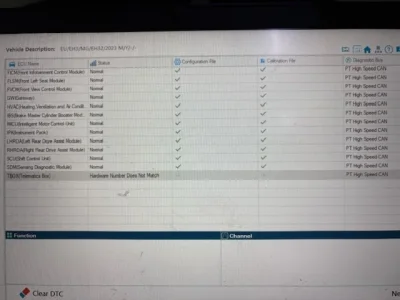
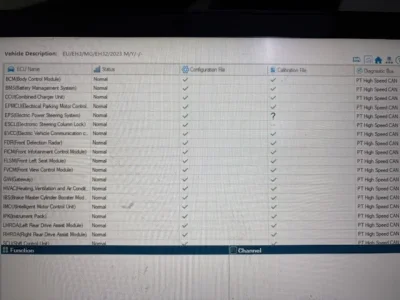
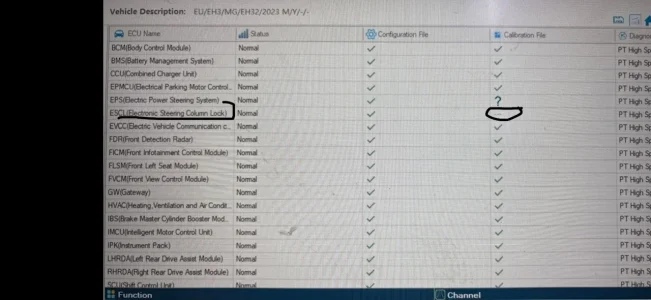
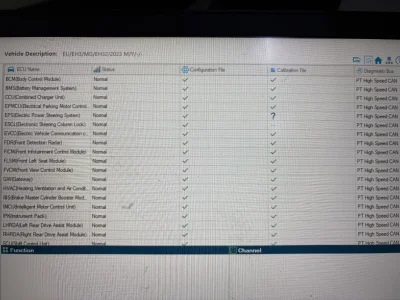
In the Sips application, there is a question mark on the EPS module calibration—is this normal?

My other question is: What is the ESCL module, and why does it appear as ā€œā€¦ā€ (or blank/incomplete) in the calibration file?

Is there a problem with these modules?


ā€œIn Turkey, since the T-Box units have been replaced, the T-Box version appears different as you can see — and accordingly, it’s already showing as not matching the vehicle’s VIN number.ā€
 

Attachments

  • a.webp
    a.webp
    34.6 KB · Views: 13
  • aa.webp
    aa.webp
    43.9 KB · Views: 13
  • aaa.webp
    aaa.webp
    27.8 KB · Views: 13
So i know from a lot of reading around these forms that the software in Australia is a little bit different then the rest of the world, but I have no idea what my
SWI131-29958-1100R05 compares to when comparing to the R27-67-71 ETC as the Australia version has the SWI131 code.

Also my MCU version is -125.1.3.0 which i believe is a real impossibility as ive never seen a negative version number!

Attached is the software page from the car
Latest for SWI131 looks to be R27
HERE
 
@serkancelenk Please have a look on my post here. When you're in the ECU section of SIPS, it shows all control units in one list and you can check āœ… or āŒ. One Press sometimes shows a list with āž– orā“. If you need further assistance feel free to ask.
And about your TBox: If it's a replacement, you have to flash it like a replacement because it needs your vehicle's VIN written in.
 
@serkancelenk Please have a look on my post here. When you're in the ECU section of SIPS, it shows all control units in one list and you can check āœ… or āŒ. One Press sometimes shows a list with āž– orā“. If you need further assistance feel free to ask.

And about your TBox: If it's a replacement, you have to flash it like a replacement because it needs your vehicle's VIN written in.
First of all, thank you very much for your message and support.

Since I don’t have the SIPS application, I had these procedures done at the service center. The authorized technician didn’t really know what needed to be done.

We performed the ā€œreprogram missing SIPSā€ option on the vehicle, but:

• The question mark (?) next to electronic steering calibration still remains and hasn’t gone away.

• The other item (the one with the three dots …) still appears to be inactive / not available for reprogramming.

I suspect the service center’s SIPS application is not up to date either.
 

Attachments

  • 1.webp
    1.webp
    98.7 KB · Views: 5
  • 2.webp
    2.webp
    661.1 KB · Views: 7
@serkancelenk I think your overview looks fine. There are other users with Luxury models who can check your screenshot of one press overview. āž– is not a problem, it would be one of you'll see āž– in the general overview. Then it could be that you service centre uses a newer version of SIPS.
 
@serkancelenk I think your overview looks fine. There are other users with Luxury models who can check your screenshot of one press overview. āž– is not a problem, it would be one of you'll see āž– in the general overview. Then it could be that you service centre uses a newer version of SIPS.
How do we view the SIPS data in the vehicle ECU and the manufacturer database? In other words, the SIPS number currently loaded in the vehicle and the SIPS number that should be the latest/updated one…

In the service system, we check whether it’s up to date: if it’s the current/latest version we see a tick/check mark (āœ“), and if it’s not up to date we see an X.ā€

Alternative slightly more natural version:

ā€œHow can we check the SIPS information in the vehicle’s ECU and compare it with the manufacturer’s database? That is, we want to see the SIPS number currently installed in the car and the latest SIPS number that should be installed.

In the service interface, it shows whether it’s up to date: a tick mark appears if it’s current, and an X if it’s outdated/not the latest.ā€

Thank you @DonBattino452
 

Are you enjoying your MG4?

  • Yes

    Votes: 1,069 77.7%
  • I'm in the middle

    Votes: 208 15.1%
  • No

    Votes: 100 7.3%
Support us by becoming a Premium Member

Latest MG EVs video

MG4 EV Refresh + NEW MG4 EV Urban - UK arrival dates, prices, specs (2026)
Subscribe to our YouTube channel
Back
Top Bottom