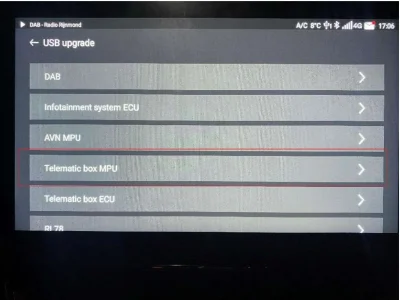
Like said before, both (infotainment and TBOX) only with SIPS cause it's a 2024 model build.
I don't know TBOX soft version for 2024 models so I can't help tou
And you can use the files in Haloweenhamster drive to download SIPS yes. But you'll also need a VCI device and a SIPS account to login
If you attempt the FICM update you'll have to let us know how you get on
(It might be risky)
If dealerships required a new interface due to the update failing then the Vnci might not work for the bigger updates
I'd probably still try it but I don't mind risk, I also don't have a newer car to try it unfortunately
Well, friday afternoon I had the time for applying all of the updates via SIPS.
Our MG4 has the following specifications:
Model: MG4 Luxury (EH32-X9)
Production: May 2024
MY: 2024
FICM: SWI133-29176-1300R30
TBOX: SRAP027E4Y
All SIPS updates went flawlessly and everything is up to date (including the SIPS "part" of FICM).
The FICM still reports that it's on SWI133-29176-1300R30.
The LFD-Tool (VIN-specific) downloaded 8 files, 4 at a size of around 80MB and 4 around 850-900MB.
After extracting the files, i could identify the smaller ones. They are USB-Updates for the TBOX, the newest seems to be my installed version SRAP027E4Y.
Among the bigger files there's also one that matches with haloweenhamster's Google Drive file for the SWI133 R36. I also managed to extract the system folder out of the packed payload.bin files.
So it seems I got downloads for:
R22, R32, R36 and R41. But it didn't download the installed R30.
All these bigger files are packed with two files:
installer.json
usb_ota_update.zip
I tried many different ways, but i can't install these update packs via USB ("special" service menu).
It always says (this is the plain translation of the German notification, it may be a little different in english):
"The package in the root directory of the USB flash drive is not recognized correctly. Please check if the storage address of the package is correct."
For me it looks as if I had to find out the correct folder structure.
The installer.json gives no hint to a specified folder structure.
I spent hours and tried all the folder structures i could find in this and other forums, also putting the two files (installer.json and usb_ota_update.zip) into the root folder. I also tried all options with and without the installer.json.
None worked.
I also downloaded the files multiple times with the LFD tool to be sure all files are ok.
I also tried various sticks (USB 2.0 and 3.0, all prepared with rufus in FAT32).
The result was the same.
After every attempt, the FICM created a new empty folder on the USB stick called "LOST.DIR"
In SIPS there is no other way to get more updates. I spottet no further functions.
I even installed the latest SIPS, still no menu option for further FICM-related updates.
So i assume that there has to be a way to apply these USB update files.
Why else should the LFD tool download specific updates with usb_ota_update.zip files?
I also assume that the note from 04/25/2025 doesn't apply to our EH32-X9 because it says this applies to the newer MY24 X10 models... It seems as if our MG4 is an "older" MY24.
So for the moment I'm stuck with R30 and have no idea at all...


 ... Even for my MG4
  .
.