Diagnostic VDI, VNCI, MDI with MG4

where can I find VDS3 for testing ?
It's available through the link in my signature and through the link in this post
 
If you have a sips login the best way is to go to large file downloader, enter vin,, it'll download files only for your car, open the .51 files with a zip program

Or go to the zz sso mg motor website use Sips login and you can see the current version of any module on the car in mg style eg 11734123.51

@haloweenhamster
I have for TBOX "Operating Software" - 11476583.1 and for "Secondary application software" 11476584.51. I can unzip the .51 file but not the .1

It's this 11476583.1 that I should place in the TBox_MPU folder in the USB Drive and update the Secondary application Software via SIPS? (ZSEV)

Thanks
 
Where did you get the ‘.1’ from? I just did a complete download with SIPS and it downloaded around 920 GB! But there is no ‘.1’ file.
There are only ‘.51’ to ‘.58’ files and one ‘.A2’ file.
The complete download directory has 1419 files.
 
Might have been .01

Not having a zs it's hard to say

Might be that .01 file has to loaded via SIPS & .51 file via usb, but that's just a guess
 
As I said, I did the entire download via SIPS and only got the ones with the extensions I mentioned earlier. Where can you get the files that need to be loaded via USB?
 
I know that, that's where I got the software from 😉. I'm interested in the software that is installed via USB, because I don't have a ZS or MG4, but an HS Phev 🙈. I thought you could also get it via SIPS.
And yes, I know this isn't an HS forum, but there's still a lot of good information here that is also helpful for the HS.
 
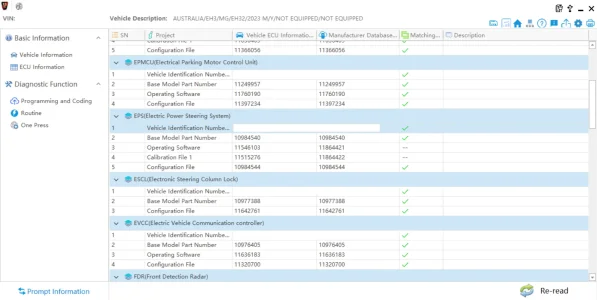
No new 51 updates in AU apart from a new power steering update that it won't let me install, comes up with a EPS (Electric Power Steering) new software version, but when i try apply it it asks for a confirmation code and has a message along the lines of "this is upto date, is the customer actually experiencing issues" which is new to me. anyone else seen this?
 

Attachments

  • Screenshot 2026-03-01 183634.webp
    Screenshot 2026-03-01 183634.webp
    91.9 KB · Views: 43
So I have been doing some attempts as well, I manage to use the latest SIPS version the 1.0.2.7 version. To login to it, you need to use the SNW account. But before you try to use it first login to the provided servicenow website and change the password, after that with the username, changed password and captcha you can login.

To get the latest software including the VDS hotfix55, on the servicenow website there is a small chatbubble icon on the left click there, then click technical documentation and they should appear in the list there for download.
 
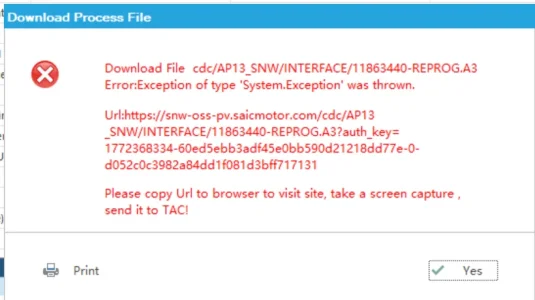
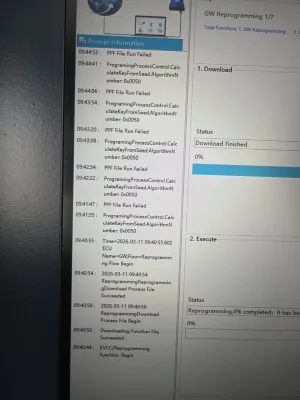
I'm able to establish a connection to my vehicle through SIPS. However, any module that i try to update just errors.

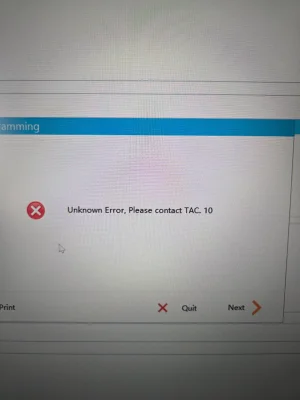
I'm getting "PPF File Run Failed" error and then the process stops with the message "Unknown Error, Please contact TAC. 10"

Have anyone else had similar errors or knows what i'm doing wrong?

I'm also getting several errors when I start the car now. It drives ok, but with multiple system errors. I've disconnected the 12v battery for 20 minutes but that hasn't helped. The errors are ACC, Forward Collision, AEB, Driver Drowsiness and LKA systems. Am I fight thinking these all use the FVCM? Anyone know how I can fix this?

Thanks
 

Attachments

  • 20260311_094506.webp
    20260311_094506.webp
    305.8 KB · Views: 26
  • 20260311_094502.webp
    20260311_094502.webp
    527.4 KB · Views: 25
Last edited:
I'm able to establish a connection to my vehicle through SIPS. However, any module that i try to update just errors.

I'm getting "PPF File Run Failed" error and then the process stops with the message "Unknown Error, Please contact TAC. 10"

Have anyone else had similar errors or knows what i'm doing wrong?

I'm also getting several errors when I start the car now. It drives ok, but with multiple system errors. I've disconnected the 12v battery for 20 minutes but that hasn't helped. The errors are ACC, Forward Collision, AEB, Driver Drowsiness and LKA systems. Am I fight thinking these all use the FVCM? Anyone know how I can fix this?

Thanks

Managed to sort it. I updated the firmware of the VNCI. The FVCM kept failing so I had to use the replacement function to update it. Everything else alsl updated fine after the firmware update. 😀
 
Managed to sort it. I updated the firmware of the VNCI. The FVCM kept failing so I had to use the replacement function to update it. Everything else alsl updated fine after the firmware update. 😀
First of all, congratulations.
When I performed my update process, I used VNCI_DevMngr_Setup_x86_1v9.
Once installed, it notified me of an update I hadn't performed, and everything worked perfectly. What version of VNCI do you have now?
 
First of all, congratulations.
When I performed my update process, I used VNCI_DevMngr_Setup_x86_1v9.
Once installed, it notified me of an update I hadn't performed, and everything worked perfectly. What version of VNCI do you have now?
I think it was version 2.2 and firmware 1.0.0.8.
 

Are you enjoying your MG4?

  • Yes

    Votes: 1,081 77.8%
  • I'm in the middle

    Votes: 208 15.0%
  • No

    Votes: 102 7.3%
Support us by becoming a Premium Member

Latest MG EVs video

MG4 EV Refresh + NEW MG4 EV Urban - UK arrival dates, prices, specs (2026)
Subscribe to our YouTube channel
Back
Top Bottom