jamakr4
Established Member
- Joined
- Mar 2, 2025
- Messages
- 330
- Reaction score
- 495
- Points
- 168
- Location (town/city + country)
- Germany
- Driving
- MG4 (2022-2025)


 . However, before SIPS proceeds to the “Fast Learn” routines, you can abort the process — and that will cause problems later on. In that case, the process is incomplete, even though everything shows .
Congratulations on resolving the scare successfully!I’ve attached a few pictures of the process.
Overall, it wasn’t difficult — you just had to know exactly what you were doing. For me and my friend, it was the first time flashing control units as a replacement.
And I’ll stick with this conclusion: this experience confirmed it for me — the MG4 is a “good” car. It’s quite robust and even forgives serious mistakes that can happen during improper flashing.
In general, regarding flashing as a replacement: this is absolutely NOT required under normal circumstances. This function is only intended for cases where a control unit has been physically replaced — for example due to a hardware failure or as part of repairs after an accident.
Some users here have reported that they had to use this method because normal reprogramming didn’t work for them, for whatever reason. But why was that? Because their flash setup had flaws — different kinds of flaws. Sometimes the laptop wasn’t configured correctly, sometimes people hadn’t properly familiarized themselves with SIPS. In other cases, the 12V charger was set up incorrectly: even though it was capable of delivering 5 amps, it was accidentally set to 1 amp, and the voltage dropped critically during flashing. The list of possible mistakes is long… far too long. And in every case, the issue was user error — not SIPS itself.
By now, I’ve accompanied several update processes across different setups — Standard and Luxury, MY22 and MY23. Personally, I don’t believe that a fully functional control unit would suddenly fail out of nowhere. If the setup is done correctly, you can fully update your car via standard reprogramming, and there’s no need for follow-up calibration routines with an “uncertain” success rate.
Fortunately, I have a contact within my family who works with Maxus, which is also part of the SAIC group. He confirmed my assumptions and emphasized how important it is to be thorough: this is not something you do “quickly on the side.” Installing and running SIPS on a regular consumer laptop — while also using it for things like Netflix, online banking, or other software — is absolutely not recommended. Unexpected interactions with other programs can occur. There’s a reason why workshop laptops are set up in a very specific way and are dedicated exclusively to this purpose.
I wish everyone who follows success with their updates, the necessary level of care during the process, and, afterwards, plenty of enjoyment driving their MG4s.

The same here :So… now it finally happened to me as well — or rather, to a friend of mine: we had to perform calibration routines.
What happened? During the first attempt to flash with SIPS, the laptop shut down in the middle of the FVCM update because the power supply wasn’t properly connected. That was a scary moment! Especially with such an important control unit and an interruption right in the middle of the flashing process.
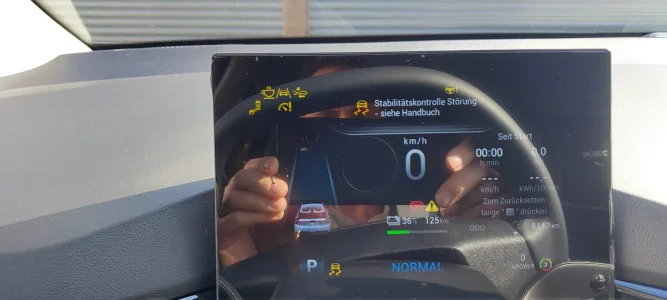
The result? He had four permanent yellow warning icons on the dashboard: the coffee cup, lane assist, emergency braking, cruise control, and the yellow exclamation mark. Even disconnecting the 12V battery for 24 hours didn’t fix anything.
Since we live about 250 km apart, we had to improvise and decided to use TeamViewer.
This time, we were extremely meticulous — the flash setup had to be flawless. Setting up the laptop with SIPS and VDS took almost 90 minutes. All potential sources of interference were systematically eliminated. A few keywords (even if it sounds repetitive): antivirus and firewall completely disabled via Windows Group Policy, high-performance mode enabled, all power-saving features disabled (USB selective suspend, disk sleep, PCIe power management, HDD/SSD timeout), CPU set to 100% performance. All of this can be found in the advanced power settings. No personal laptop should be configured like this normally, as it would consume too much power for everyday use.
First, we checked with VDS whether communication with all control units was working — it was, everything showed “Communication OK.”
Then we switched to SIPS. For the affected control units, the “ECU information” showed “--”, “FFFFFFFFFFFF”, and “00000000000,” as expected. When attempting a reprogramming, SIPS (version 1.0.27, available on servicenow.smil.com) threw a communication error.
However, when starting a flash process as a replacement, it went through. We only had to request a verification code via servicenow.smil.com (very easy — you just need the VIN and the short name of the control unit you want to update).
At first, everything proceeded like a normal update. We ended up with green checkmarks
We decided that my friend would proceed as follows: the VNCI adapter remained plugged into the OBD port and connected to the SIPS laptop via USB. The laptop was connected to the internet via LAN in the carport, but this connection was disconnected for the calibration drive. The laptop was then placed on the passenger seat — still connected and running SIPS.
Initially, we planned that I would stay connected via TeamViewer during the calibration drive using my friend’s smartphone hotspot. Unfortunately, that didn’t work: SIPS kept throwing an “Unknown Error 32,” and the progress bar wouldn’t move.
By pure chance, we discovered that the SIPS laptop must remain connected during the calibration drive — but WITHOUT any internet connection.
And then it finally worked! He started the calibration routine, followed the instructions, and both on the dashboard and in SIPS the progress indicators started to move. Messages like “Calibration Successful” and “Calibration OK” appeared everywhere. In the end, he parked the vehicle, locked it, and waited 60 seconds before getting back in and driving home.
To be on the safe side, we also performed the FDR routine. In the end, all yellow warning icons were gone and EVERYTHING worked properly again!
Man… that was a tough one — as we would say in Germany. We started at 14:30 and finished around 19:30.
Heyupdating my BCM and the car dims mid way through and then the reprogram stops. Car doesn’t start up now?? Did I just brick my car?
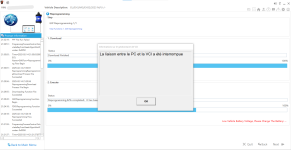
For now, it's just an update, mainly as support since it will be the first time he sees the interface.@Pisuke You can use AnyDesk of course, too. If you know exactly what to do you can instruct your mate on "the other side". You are in charge of mouse und keyboard input then.
Just updating? Do you need assistance with fast learn routines?
What CPU do you have (arm or x86)?I have installed VDS3 and using yellow VNCI device. It is recognized and looks good in VCI Manager app. But VDS3 app does not launch. It says loading then crashes. Nothing more. I am using x64 windows 11. Tried to launch as administrator. No change. Any suggestion?
Ok should be fine - what does the error say?It is not ARM. System info:
Device name ASUS
Processor AMD Ryzen AI 9 HX 370 w/ Radeon 890M (2.00 GHz)
Installed RAM 32,0 GB (31,1 GB usable)
Graphics card NVIDIA GeForce RTX 4070 Laptop GPU (8 GB)
AMD Radeon(TM) 890M Graphics (476 MB)
Storage 5,15 TB of 7,28 TB used
System type 64-bit operating system, x64-based processor
The Pc shuts down? Just wait, it takes like 5-10 minutes on my pc to start. During start nothing happens as wellNo errors. Just shuts down. I check task manager vds.exe launches then dissapears from the task manager list. No errors. I am not sure if there is log file.
I know it takes some time to launch but after waiting enough nothing happens. Pc doesn't shut down. I have installed hotfixes. Do I need to connect car? I just connected vnci device via usb but there is no active obd connection now.The Pc shuts down? Just wait, it takes like 5-10 minutes on my pc to start. During start nothing happens as well
I was able to start it without the VNCI Adapter connectedI know it takes some time to launch but after waiting enough nothing happens. Pc doesn't shut down. I have installed hotfixes. Do I need to connect car? I just connected vnci device via usb but there is no active obd connection now.
You need to be connected to the car to read the VINI know it takes some time to launch but after waiting enough nothing happens. Pc doesn't shut down. I have installed hotfixes. Do I need to connect car? I just connected vnci device via usb but there is no active obd connection now.