Diagnostic VDI, VNCI, MDI with MG4

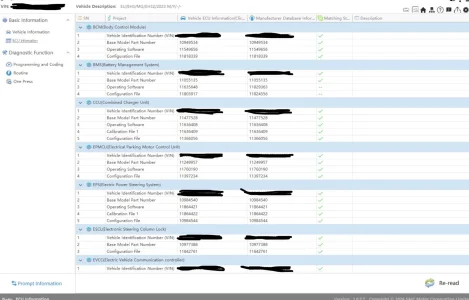
I read out my MG4 via SIPS using the VDI3 device. All control units show a green check mark. However, under “Matching” some entries are marked with “-–”. What does this mean?

I was also unable to update any of my control modules via One Press, as the “Next” button was greyed out.

In addition, the FCIM shows a “?”. What could this be? Maybe the USB updates of the RXX versions?
 

Attachments

  • 786c6532-a5c9-4ed9-8fea-d9169e27f90a.webp
    786c6532-a5c9-4ed9-8fea-d9169e27f90a.webp
    85 KB · Views: 41
  • IMG_6634.webp
    IMG_6634.webp
    13.3 KB · Views: 39
I am also currently looking into this topic and have now read through all 38 pages, although I have to use Google Translate as English is not my native language.
However, I have question:
What does it say under 'user profile' on your rmi page? I created a company account, but my profile says 'normal' under 'user type'.
Shouldn't it say something else for a company account?
 
I read out my MG4 via SIPS using the VDI3 device. All control units show a green check mark. However, under “Matching” some entries are marked with “-–”. What does this mean?

I was also unable to update any of my control modules via One Press, as the “Next” button was greyed out.

In addition, the FCIM shows a “?”. What could this be? Maybe the USB updates of the RXX versions?
You're using the newer software, revert to an older version
 
Those commenting about network setup on installation, it should be done with the interface connected
Although it's a USB connection it's ethernet over USB, so the network it's trying to setup is for the adapter not Internet or anything else
With a VM as long as you have USB pass through it should work correctly even with 1 network connection
 
Dealer tried to do updates via sips. He got "VIN does not match contact TCA" and some modules lost connection to canbus.

He manged to restore the modules operating but give up on the updates.

My question is:

What is the reason that the update failed?
Can i only carry the t-box USB update without the sips side?
 
You mean revert to an older version for the infotainment system via USB flash, right?
SIPS, nothing to do with the car

Can tell by the new status icons
The new version also requires codes from MG Service Now, read posts around here


Screenshot_20260110_124727_com.adobe.reader.webp
 
Dealer tried to do updates via sips. He got "VIN does not match contact TCA" and some modules lost connection to canbus.

He manged to restore the modules operating but give up on the updates.

My question is:

What is the reason that the update failed?
Can i only carry the t-box USB update without the sips side?
I haven't seen how the vin is coded or if it can be virginised yet, I need to find someone that could look into it, I hit a dead end, need someone more knowledgeable to have a look

If you're getting vin mismatch then either used parts have been fitted or replacement parts haven't had the vin written to them (normally automatically written when configured to the car with other brands)
 
ficm_fail.webp


Does anybody know why FICM fails every time? I'm on R42 already... 😥

EDIT: I found the solution by myself: It's the 'faulty' R42. With R40 everything went smoothly 🎉.

Everywhere ✅ 🎉🎊:
Screenshot 2026-01-10 174020.webp

Screenshot 2026-01-10 174030.webp

Screenshot 2026-01-10 174111.webp

Screenshot 2026-01-10 174139.webp


Thanks a lot for everyone who helped me! Special thanks to @haloweenhamster !
 
Last edited:
I haven't seen how the vin is coded or if it can be virginised yet, I need to find someone that could look into it, I hit a dead end, need someone more knowledgeable to have a look

If you're getting vin mismatch then either used parts have been fitted or replacement parts haven't had the vin written to them (normally automatically written when configured to the car with other brands)
Dealer manged to solve the problem.
Probably was 12V voltage problem.

But the dealer decide to not update the modules.

I am thinking about doing it myself.
 
One question: after logging in with Saic Motor, can I continue to use the SIPS/VDS applications offline, or do I have to stay connected all the time? I'm especially interested in the VDS program.
 
Ok, so I'm about to bring everything up to date again / install R69 on the XPower etc but have noted that in the VNCI Device Manager it's updated the dongle firmware to 1.0.0.9 but software update from v1.9 to 2.0 fails every time - not that it will make any difference using SAIC VCI Manager, with the firmware already successfully updated, but out of curiosity does anyone have access to a standalone version of 2.0?
 
@Muffler
I can confirm that the update to version 2.0 fails, it gets to completion, and then fails. I don't think it has much of an impact, though.
 
Ok, so I'm about to bring everything up to date again / install R69 on the XPower etc but have noted that in the VNCI Device Manager it's updated the dongle firmware to 1.0.0.9 but software update from v1.9 to 2.0 fails every time - not that it will make any difference using SAIC VCI Manager, with the firmware already successfully updated, but out of curiosity does anyone have access to a standalone version of 2.0?
It actually worked for me - but as already said doesn't seem to make a difference.
 
If you want to install the VNCI 2.0 Update you need to run VNCI manager as an administrator/with elevated privileges. Then the installer for the update will start the correct way. But it's not necessary for successful SIPS updates 🤓.
 
Ok, so I'm about to bring everything up to date again / install R69 on the XPower etc but have noted that in the VNCI Device Manager it's updated the dongle firmware to 1.0.0.9 but software update from v1.9 to 2.0 fails every time - not that it will make any difference using SAIC VCI Manager, with the firmware already successfully updated, but out of curiosity does anyone have access to a standalone version of 2.0?
What's new on r69?
 

Are you enjoying your MG4?

  • Yes

    Votes: 1,055 77.6%
  • I'm in the middle

    Votes: 207 15.2%
  • No

    Votes: 99 7.3%
Support us by becoming a Premium Member

Latest MG EVs video

MGS6 deep dive + MG2 rumours, MGS9 PHEV preview and Cyber X tease
Subscribe to our YouTube channel
Back
Top Bottom