Diagnostic VDI, VNCI, MDI with MG4

Hi, I have bought the "VNCI VDI3 Roewe MG Wuling Maxus automotive diagnostic tool" but I'm not able to make it visible for "VCI Manager".
The "VNCI Device manager" a different piece of software, it reads it but it looks like the firmware version is 0.0.0.0 (!?) which is very strange. It should be at least 1.0.0.0 but never 0; am I right? The software version is 1.9. I tried to upgrade it using "VNCI Device manager" but every single time it fails. For this reason now is completely useless.
Any idea why is this? Any of you faced the same issue? (antivirus, firewall, everything disabled). Any advice?
 
Hi, I have bought the "VNCI VDI3 Roewe MG Wuling Maxus automotive diagnostic tool" but I'm not able to make it visible for "VCI Manager".
The "VNCI Device manager" a different piece of software, it reads it but it looks like the firmware version is 0.0.0.0 (!?) which is very strange. It should be at least 1.0.0.0 but never 0; am I right? The software version is 1.9. I tried to upgrade it using "VNCI Device manager" but every single time it fails. For this reason now is completely useless.
Any idea why is this? Any of you faced the same issue? (antivirus, firewall, everything disabled). Any advice?
Have you tried to execute it as an admin?
 
I have managed to fix it. I uninstalled the driver from Devices Manager (right click on start button) under network devices. Unplug and plug again in a different usb port. Windows recognises it and instals a fresh new driver.
Unfortunately I am not able to reprogram the T-box. I have an error message: "the second application is not refreshed to the latest version." Now I am trying to reprogram the other modules. (It is an zs facelift).
P.S. It looks like a 5 amps charger is not enough. 10 amps works well. (230V).
 
Last edited:
To perform the update, I had connected a 6A charger directly to the 12V battery and set it to continuous output; in this mode, it supplies 13.8V, just like a standard power supply. Despite this, the voltage dropped to 11.6V during the update process.
 
Hi everyone,
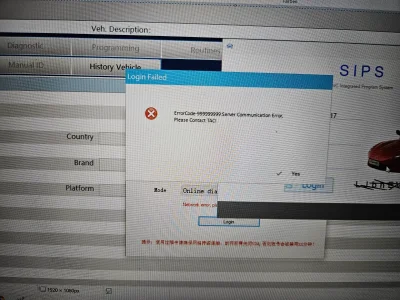
Has anyone tried logging into SIPS lately? I tried on Saturday and Sunday, but I kept getting an error message.
I need to program some new tire pressure sensors, but I couldn't get the login to work. I've already received a refund from PayPal.
Thanks!
 

Attachments

  • 20260406_104811.webp
    20260406_104811.webp
    968 KB · Views: 10
Which version of SIPS do you have? The old one doesn’t seem to work anymore. The servers have apparently been updated, so you need a newer version of SIPS. I’ll have to check where I got mine from. And it looks like a verification code is now required as well. You can find that on the Smil website in the ‘Service Now’ section.

It should be here: Microsoft OneDrive

Setup-SIPS-1_2025_8_7.ex
e
 
Which version of SIPS do you have? The old one doesn’t seem to work anymore. The servers have apparently been updated, so you need a newer version of SIPS. I’ll have to check where I got mine from. And it looks like a verification code is now required as well. You can find that on the Smil website in the ‘Service Now’ section.

It should be here: Microsoft OneDrive

Setup-SIPS-1_2025_8_7.ex
e
How to get login (register) to Smil website
 
Hi everyone,
Has anyone tried logging into SIPS lately? I tried on Saturday and Sunday, but I kept getting an error message.
I need to program some new tire pressure sensors, but I couldn't get the login to work. I've already received a refund from PayPal.
Thanks!

Had the same issue:
Has MG ended support for the older SIPS Version (the one without codes from service now)? Just asking because we are having some cases in the German forum where people can't sign into the older SIPS (multiple cases). We also did a lot of testing to ensure its not a firewall issue or something like that.
 
Just tried it my end and it's logging in and opening correctly

Wonder if it's an RMI issue as I'm now using a 'friends' login rather than buying one from RMI

At least sips doesn't seem to be the issue

Those that have had issues, have you tried the newer software to see if the same login details fail on the old software but work on the new software?
 
Just bought a login and it also went straight in

Those that are having issues have you tried disabling any security?

Possible that a windows update or defender definition update has blocked it?
 

Are you enjoying your MG4?

  • Yes

    Votes: 1,092 77.8%
  • I'm in the middle

    Votes: 210 15.0%
  • No

    Votes: 103 7.3%
Support us by becoming a Premium Member

Latest MG EVs video

MG4 EV Refresh + NEW MG4 EV Urban - UK arrival dates, prices, specs (2026)
Subscribe to our YouTube channel
Back
Top Bottom