Mouss
Established Member
- Joined
- Jan 13, 2024
- Messages
- 308
- Reaction score
- 274
- Points
- 89
- Location (town/city + country)
- France
- Driving
- MG4 (2022-2025)
Yes your account is ok


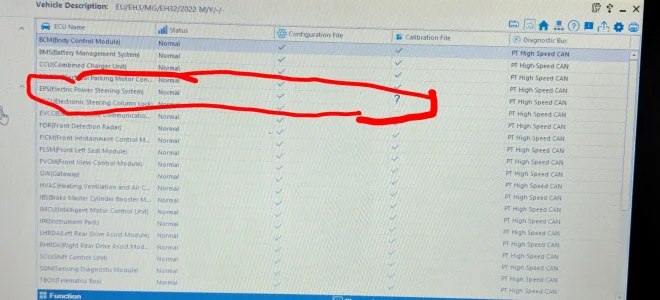
The updates was smooth without problems with vnci?Can someone explain why the "Calibration File" in EPS shows always a "?" ?
I've already reflashed the "EPS" using "replace" and recalibrated it.
All modules are up to date.
German Trophy from the end of 2022


I want to buy this VNCI VDI3 VNCI VDI3 für Rongwei MG Wuling Baojun Datong Diagnoseschnittstelle unterstützt DoIP- und CANFD-Protokoll, passend für SAIC-Gruppensoftware - AliExpress 34
To I need to do the Network setup on the Windows laptop and VDI unit as described here ?
I want to use it with SIPS-19-11-24 as I read that newer SIPS might not work ?


 !
! one) for all SAIC vehicles doesn't even have an Ethernet interface. If you want to use a wired connection via USB, you firstly need a PC/notebook with a dedicated Ethernet port (like in the description, for example from Intel or Realtek, for best compatibility) and secondly, you have to follow the uploaded instructions exactly. It looks strange that you have to set the IP address of the Ethernet port manually, but when you look at the screenshots closely, you will see that the diagnostic laptop has a wireless connection (Intel AX201) for communication with the internet. The Ethernet port is only connected after step #6 and it needs to be done because you need an active link to this special network. For example: Your home network is 192.168.1.0/24, then 172.31.7.0/24 is a different network and it is isolated. I hope that is enough information about networks in this special case. If not, you can "deep dive" into legacy diagnostic car software and networks, you will find the technical explanation for these steps – it's some nerdy stuff

 .
.
What Kind of CPU has he? I think it could be an issue with arm based CPUs (as Windows is not fully optimized for this kind of CPU architecture). Therefore it often tries to emulate older software resulting in strange behavior. Windows 11 it self isn't a problem as everything runs fine on my Mac based VM and I also know someone that did it natively on W11.Quick question regarding hardware compatibility: Has anyone successfully run this on an AMD + Windows 11 system?
A colleague of mine is struggling with the VCI Manager. When following the SIPS setup guide (PDF), clicking 'Apply' for the wired IP settings simply clears the input mask without saving. The connection status remains 'deactivated'. Any ideas if this is an AMD-specific issue?
VNCI manager is version 2.0, firmware is version 1.0.0.9 (correct version is displayed)
AMD Ryzen 3 5425, Windows 11 Pro 25H2 and Defender, UAC and Firewall completely off.What Kind of CPU has he? I think it could be an issue with arm based CPUs (as Windows is not fully optimized for this kind of CPU architecture). Therefore it often tries to emulate older software resulting in strange behavior. Windows 11 it self isn't a problem as everything runs fine on my Mac based VM and I also know someone that did it natively on W11.